
LCAYUN Singapore cloud server: 2 cores / 4GB RAM with 1000Mbps bandwidth for 100 CNY/month; 4 cores / 8GB RAM with 1000Mbps for only 152 CNY/month.
About LCAYUN
Guangdong Laika Information Technology Co., Ltd. was founded in 2022 and focuses on infrastructure cloud computing, game cloud, and related services. With multi-line BGP connectivity and a direct link to China Telecom's CN2 network, it works hard to guarantee customers high-quality, stable network resources and data-center services. In today's digital era, cloud computing has become a key driving force behind modern businesses. LCAYUN is committed to providing customers with excellent cloud computing solutions that help you fully optimize your business and achieve outstanding growth.
LCAYUN signup link with discount: https://url.vpszj.cn/lcayun
Exclusive 20%-off promo code: zeruns (usable only once per account, and renewals stay at 20% off as well; available only to users who register through my link; enter the code when paying for your order — all prices quoted in this article are after the 20% discount)
More cost-effective server recommendations: https://blog.zeruns.com/archives/383.html
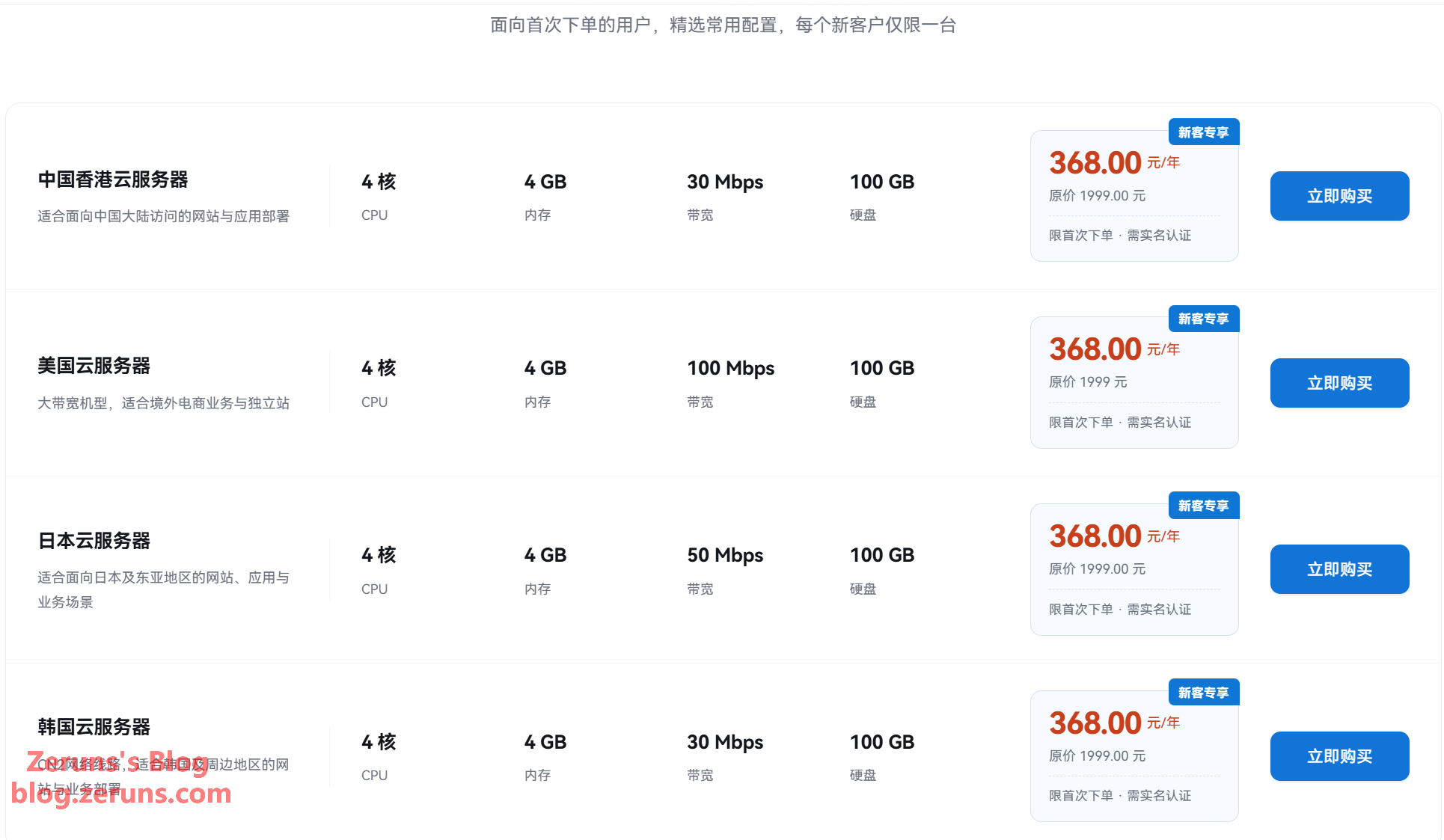
There's also an ongoing promotion: Hong Kong / US / Japan / Korea cloud servers, 4 cores / 4GB RAM / 30Mbps, only 368 CNY/year for new users, with renewals at the same price.
Tested Plan Specs
Specs of the server reviewed in this article
- CPU: 4 cores
- RAM: 8GB
- Storage: 30GB (60GB for +20 CNY, 100GB for +60 CNY)
- Traffic: 1000GB (3TB for +30 CNY, 5TB for +40 CNY)
- Bandwidth: 1000Mbps (1.5Gbps for +60 CNY, 2Gbps for +120 CNY)
- Region: Singapore
- DDoS protection: none
- IP count: 1 IPv4 + 1 IPv6
- Price: 190 CNY/month (152 CNY/month with the 20%-off promo code)
Extra IPs cost 60 CNY each (the price above includes one)
- RainYun Korea VPS review, 2 cores 4GB 40Mbps for only 32.5 CNY/month, native/residential IP: https://blog.vpszj.cn/archives/2772.html
- Kooya Cloud US CN2 cloud server review, 1 core 1GB 5Mbps for only 14.85 CNY/month: https://blog.zeruns.com/archives/950.html
- LCAYUN Xi'an China Telecom high-defense cloud server, 4 cores 8GB 20Mbps for only 60 CNY/month: https://blog.vpszj.cn/archives/2774.html
- Tencent Cloud Guangzhou Lighthouse VPS performance review, 2 cores 1GB 200Mbps unmetered for only 40 CNY/month: https://blog.vpszj.cn/archives/2512.html
- Beishaoyun Hong Kong Zone A VPS, 2 cores 2GB 10Mbps for only 18 CNY/month, direct routing on all three Chinese carriers: https://blog.zeruns.com/archives/933.html
Hardware Quality Check Script
- The CPU is an Intel Xeon Platinum 8269CY
- Sysbench: single-thread 1051.53, multi-thread 4106.90
- GB5 single-core: 809, GB5 multi-core: 2817
- Overcommit indicators: memory ballooning enabled, KSM sharing disabled
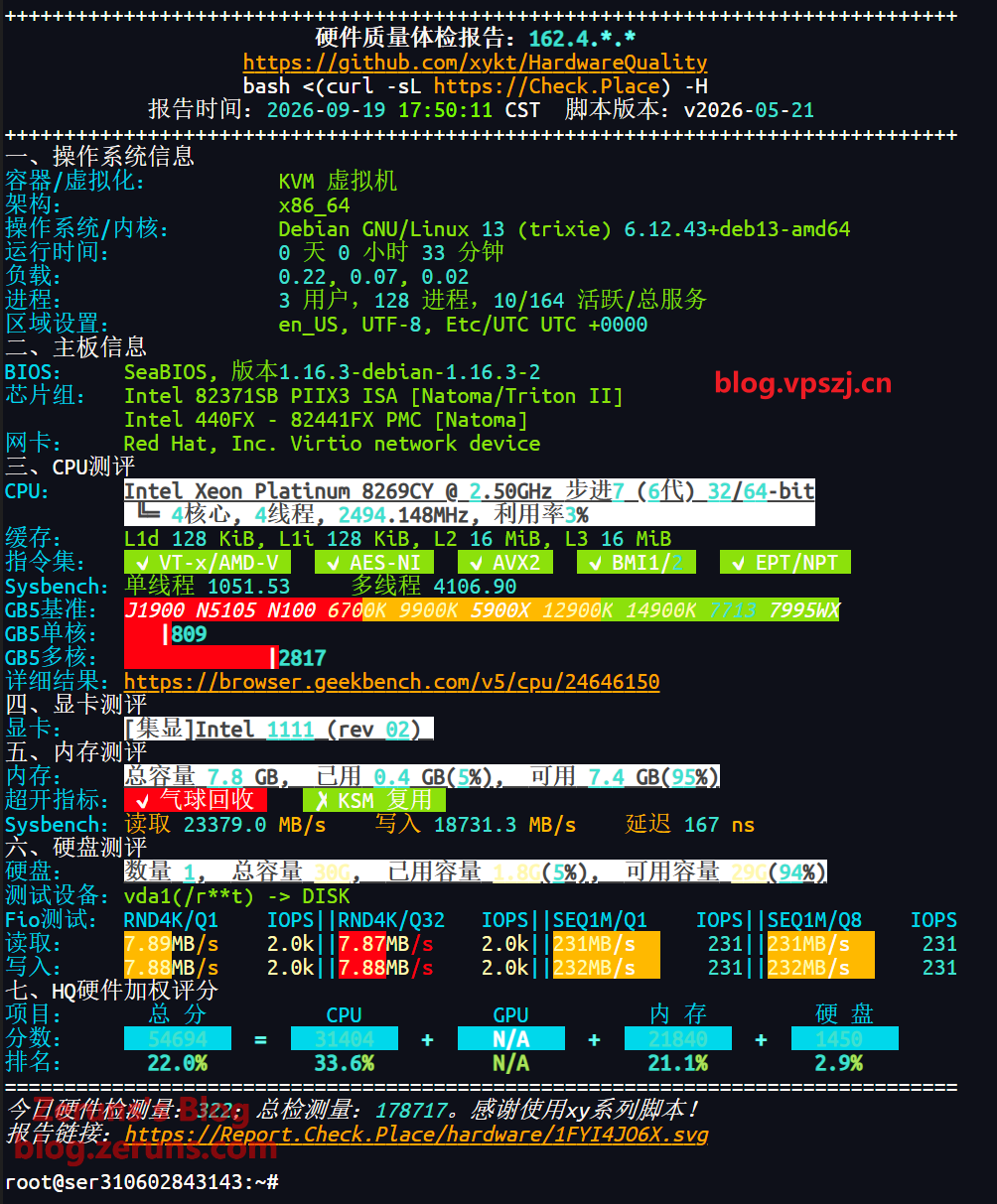
Test script:
# Standard check
bash <(curl -Ls https://Hardware.Check.Place)

# Deep mode
bash <(curl -Ls https://Hardware.Check.Place) -V
Memory ballooning is short for the virtio-balloon memory balloon driver. Think of it as an "elastic balloon" that the host places inside your VM:
- When your VM's memory has been sitting idle for a long time, the host can "inflate" the balloon, taking over the memory you aren't using and handing it to other VMs;
- When your VM's memory usage rises, the balloon "deflates" and returns that memory to your system.
KSM sharing (Kernel Same-page Merging) is the Linux kernel's memory same-page merging technology. The host kernel scans the memory of all VMs in the background and merges memory pages with identical contents (for example, the same system kernel, the same system libraries, or the same cached data) into a single copy shared by all VMs. As an example: if one host runs 10 Debian VMs, the memory pages of their system kernels are completely identical — instead of occupying 10 copies of memory, KSM merges them into one, saving a large amount of physical memory.
Performance Tests
LemonBench
Single-core: 1050.36 points, multi-core: 4180.31 points, multi-thread ratio 3.98x
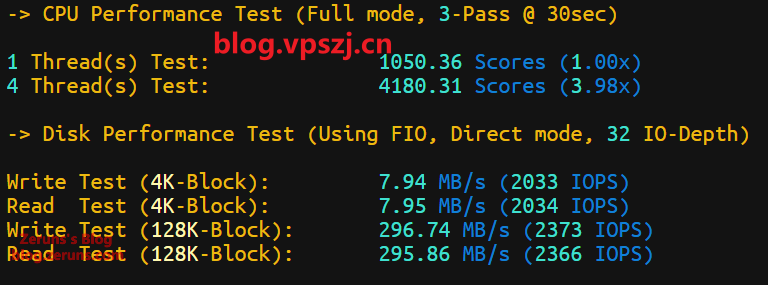
Test script:
bash <(curl -fsSL https://gitee.com/zeruns/Linux-shell/raw/master/benchmark/LemonBench-fixed.sh) -F
CPU-Z
Single-core 358.5 points, multi-core 1426.6 points, multi-thread ratio 3.98
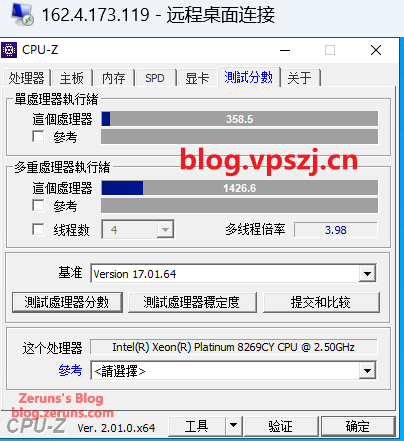
CPU-Z download: https://url.zeruns.com/cpuz
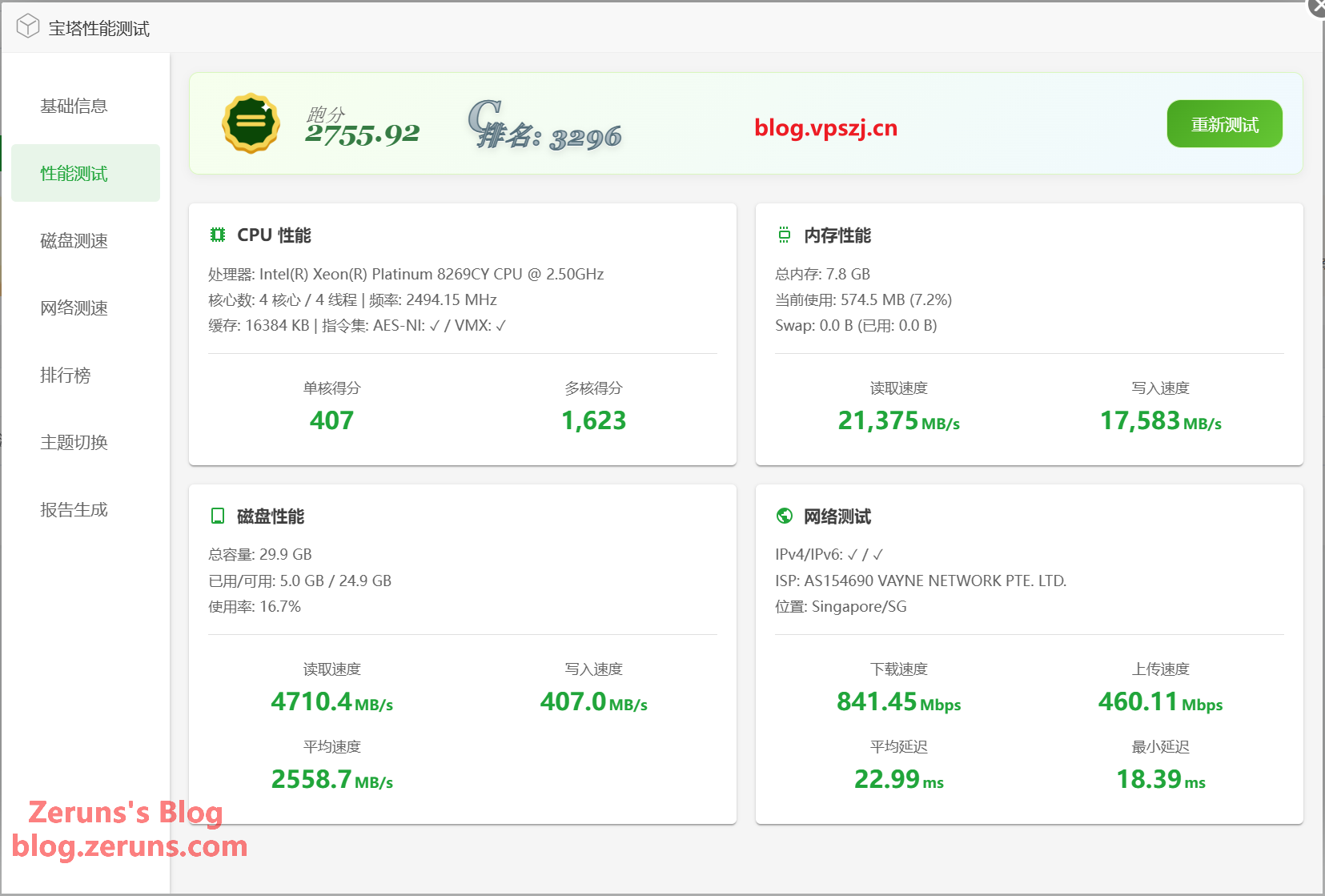
BaoTa Panel Benchmark
Single-core 407 points, multi-core 1623 points (the screenshot below is from the new version of the BaoTa benchmark)
BaoTa install script:
if [ -f /usr/bin/curl ];then curl -sSO https://download.bt.cn/install/install_panel.sh;else wget -O install_panel.sh https://download.bt.cn/install/install_panel.sh;fi;bash install_panel.sh ed8484bec
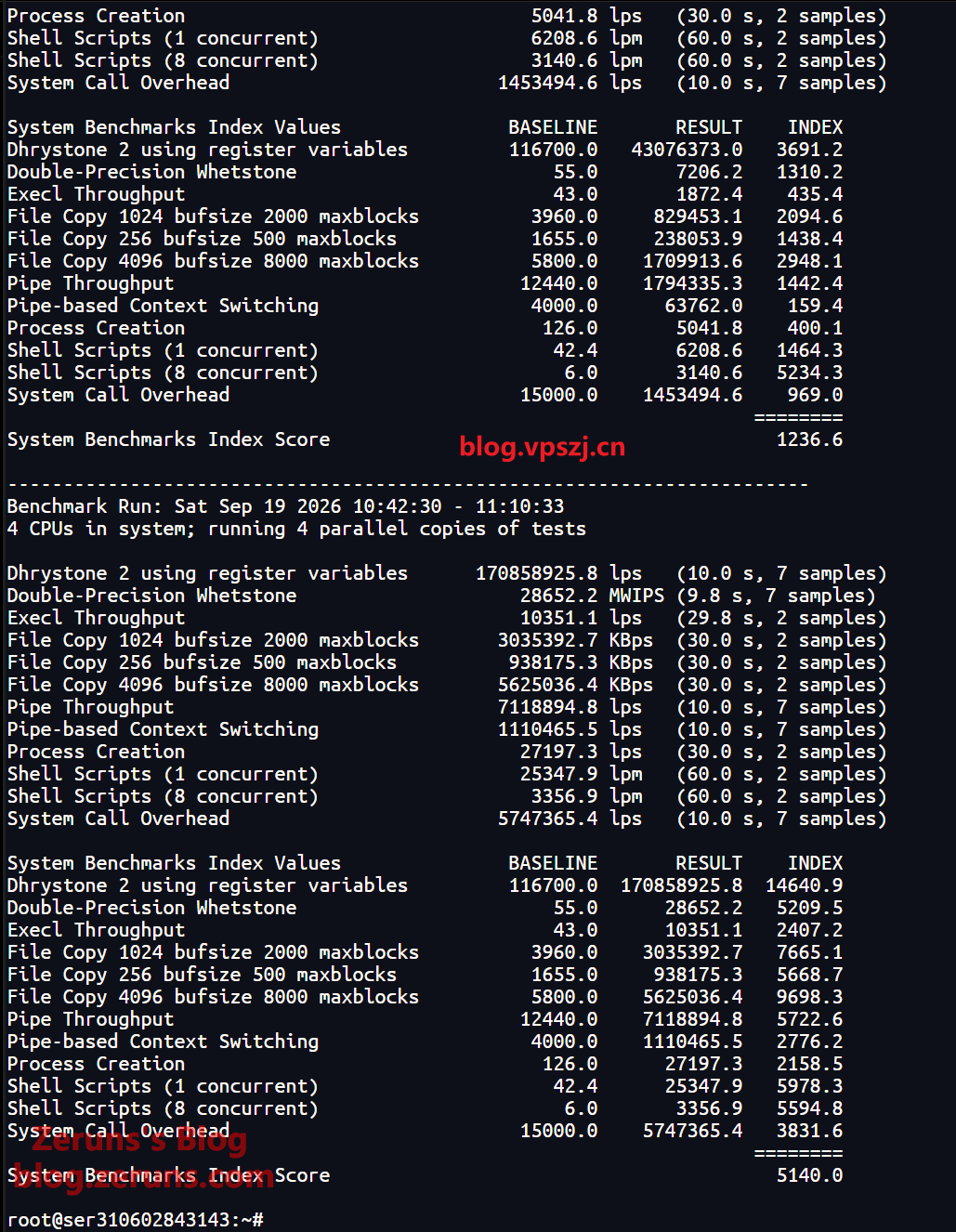
Unixbench Benchmark
Single-core 1236.6 points, multi-core 5140 points
Test script:
wget --no-check-certificate https://gitee.com/zeruns/Linux-shell/raw/master/benchmark/unixbench.sh && chmod +x unixbench.sh && ./unixbench.sh
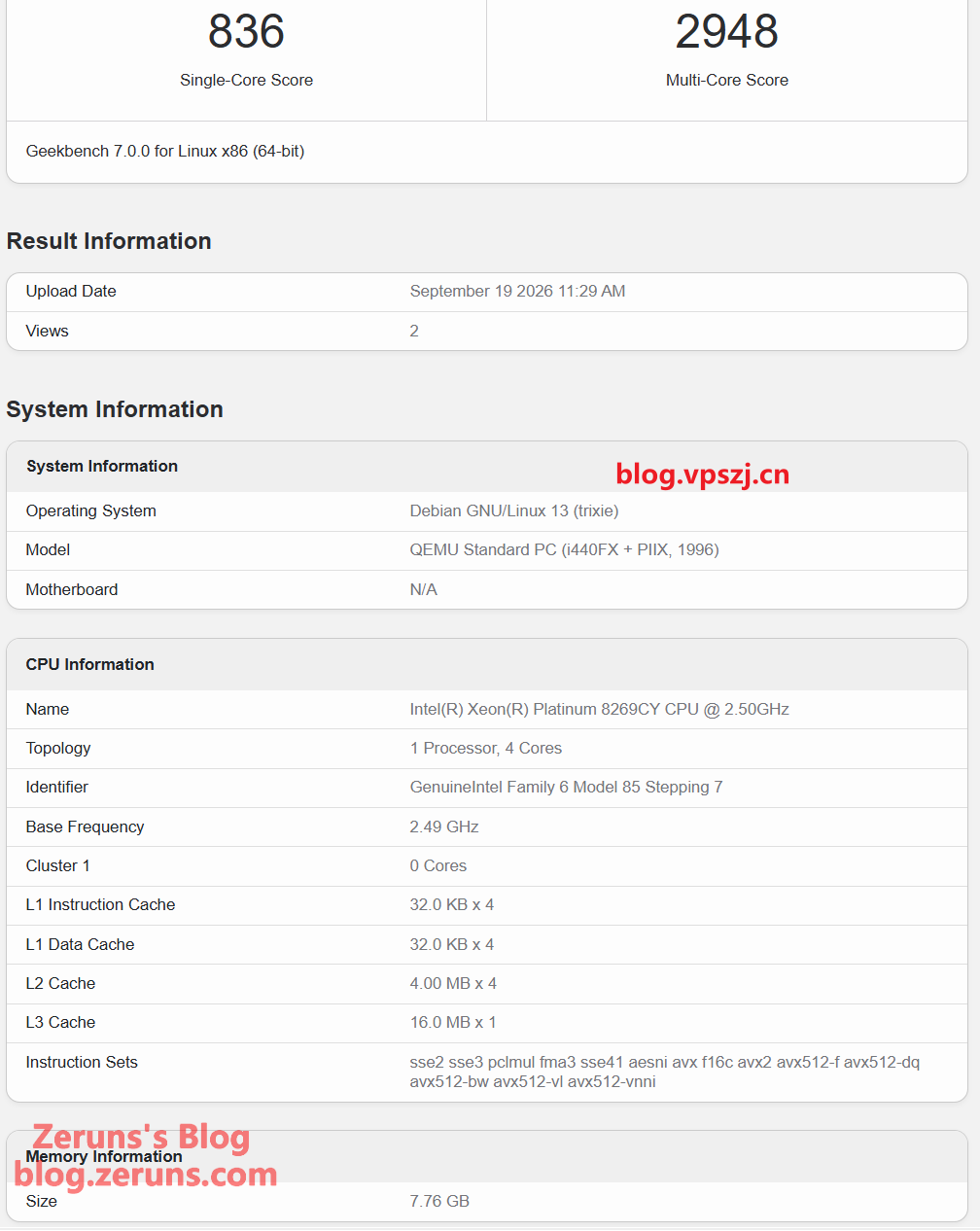
Geekbench 7
Single-core 836 points, multi-core 2948 points.
Full test report: https://url.zeruns.com/8Wd3P
Test script:
wget --no-check-certificate https://geekbench-cdn.b-cdn.net/Geekbench-7.0.0-Linux.tar.gz && tar xf Geekbench-7.0.0-Linux.tar.gz && cd Geekbench-7.0.0-Linux && ./geekbench_x86_64
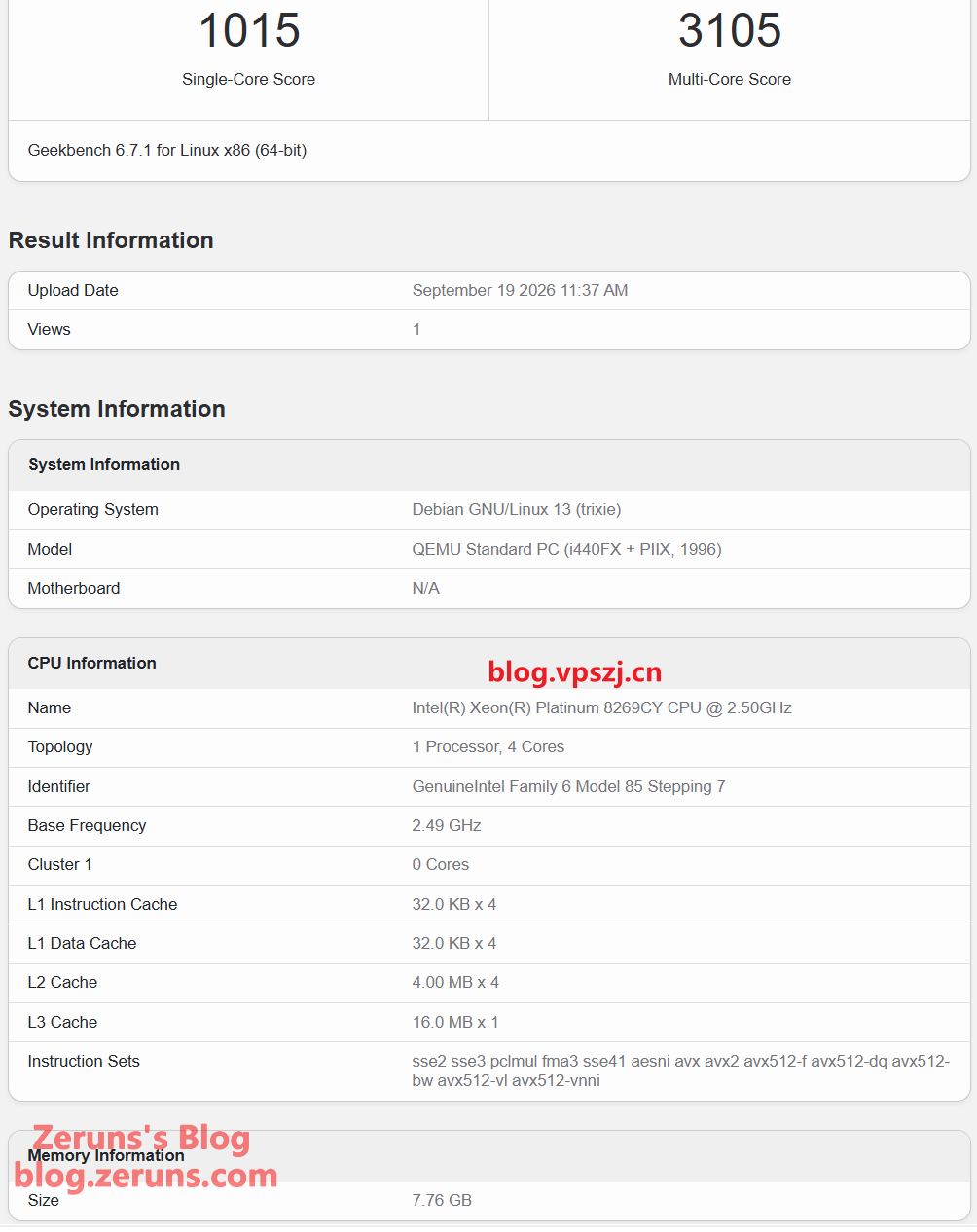
Geekbench 6
Full test report: https://url.zeruns.com/c0gt1
Single-core 1015 points, multi-core 3105 points.
Test script:
wget --no-check-certificate https://cdn.geekbench.com/Geekbench-6.7.1-Linux.tar.gz && tar xf Geekbench-6.7.1-Linux.tar.gz && cd Geekbench-6.7.1-Linux && ./geekbench_x86_64

# ARM version
wget https://img.zeruns.com/down/Geekbench-6.1.0-LinuxARMPreview.tar.gz && tar xf Geekbench-6.1.0-LinuxARMPreview.tar.gz && cd Geekbench-6.1.0-LinuxARMPreview && ./geekbench_aarch64
Bandwidth Test
Multi-threaded IPv4 speed test results from mainland China across all three major carriers (China Telecom, China Unicom, China Mobile): max download 939.39 Mbps, max upload 997.67 Mbps.
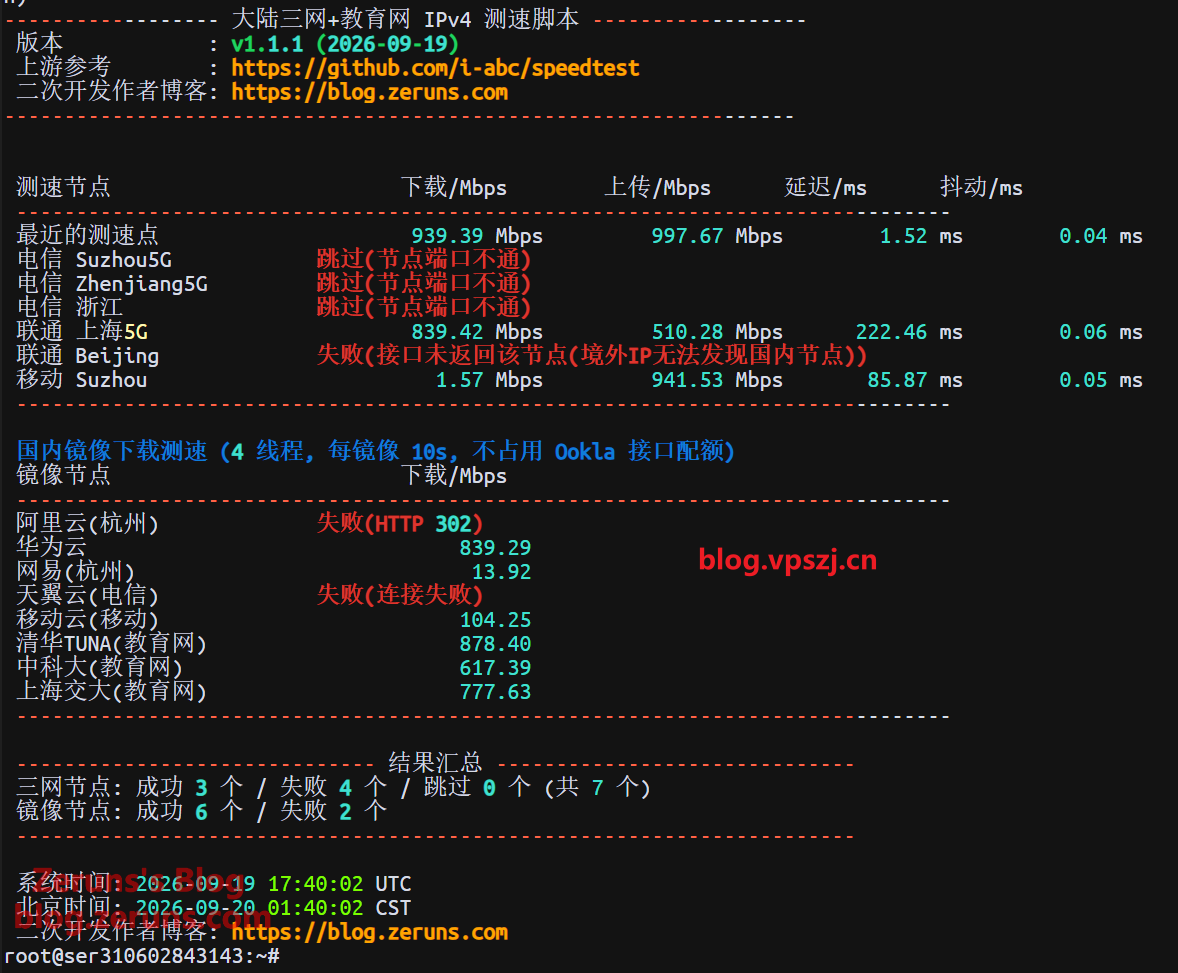
Test script:
bash <(curl -fsSL https://gitee.com/zeruns/Linux-shell/raw/master/benchmark/speedtest.sh)
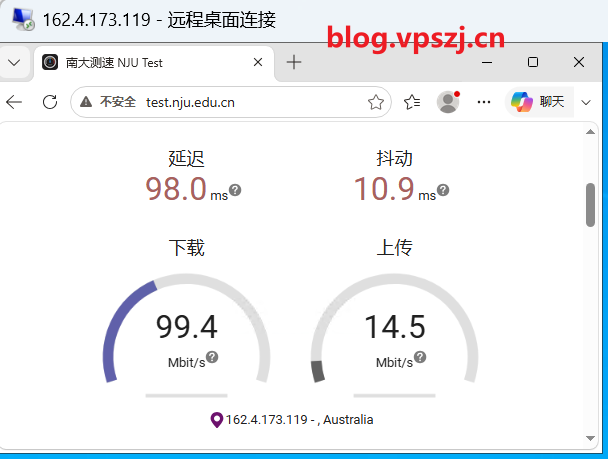
The Nanjing University speed test node measured: 99.4 Mbps download, 14.5 Mbps upload.
Network Latency
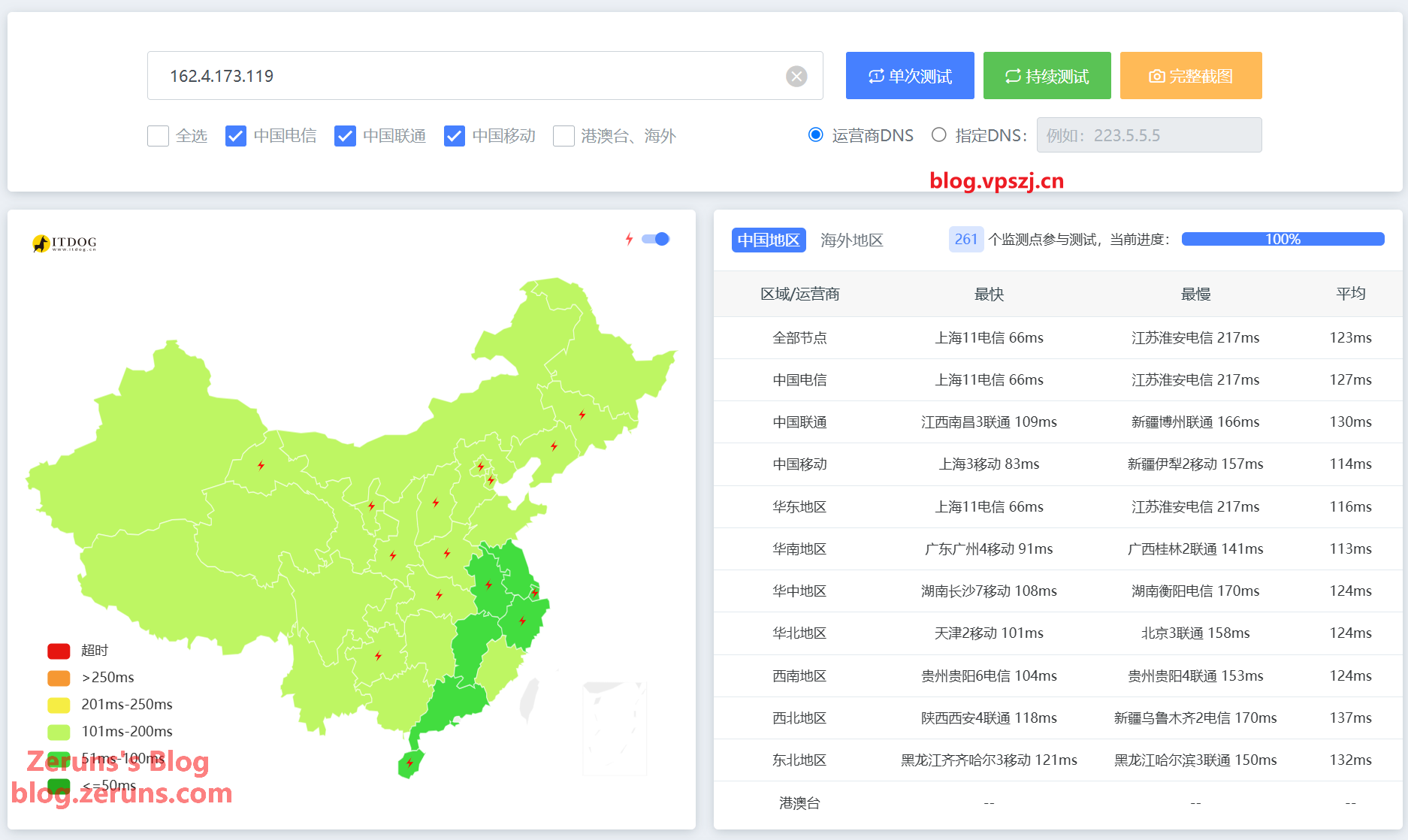
Average latency across the three carriers is 123 ms; the fastest is Shanghai Telecom at 66 ms.
Network Routing
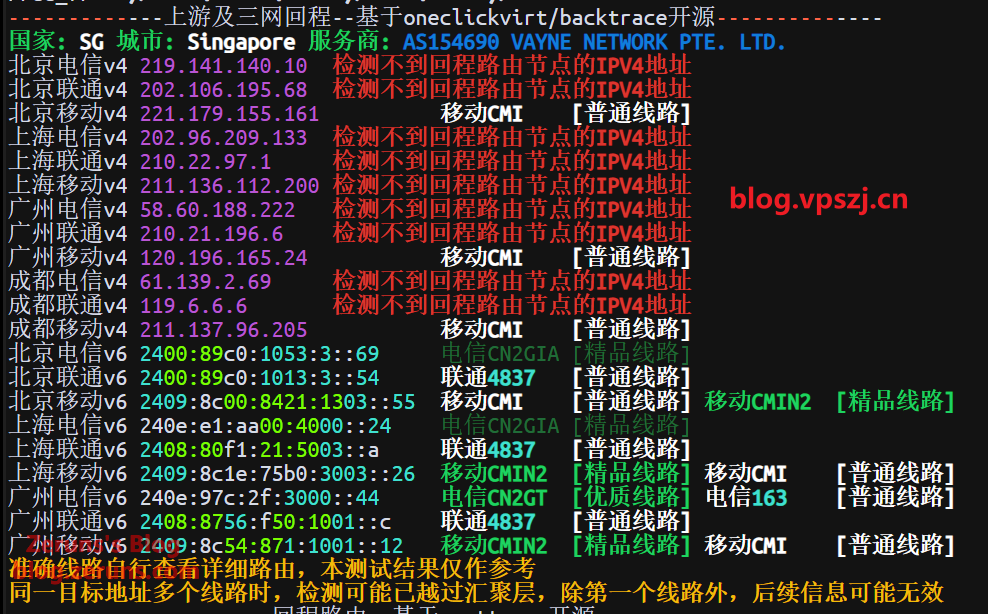
Outbound Routes
Shanghai Telecom outbound goes over the Telecom 163 backbone via NTT in Japan to Singapore.
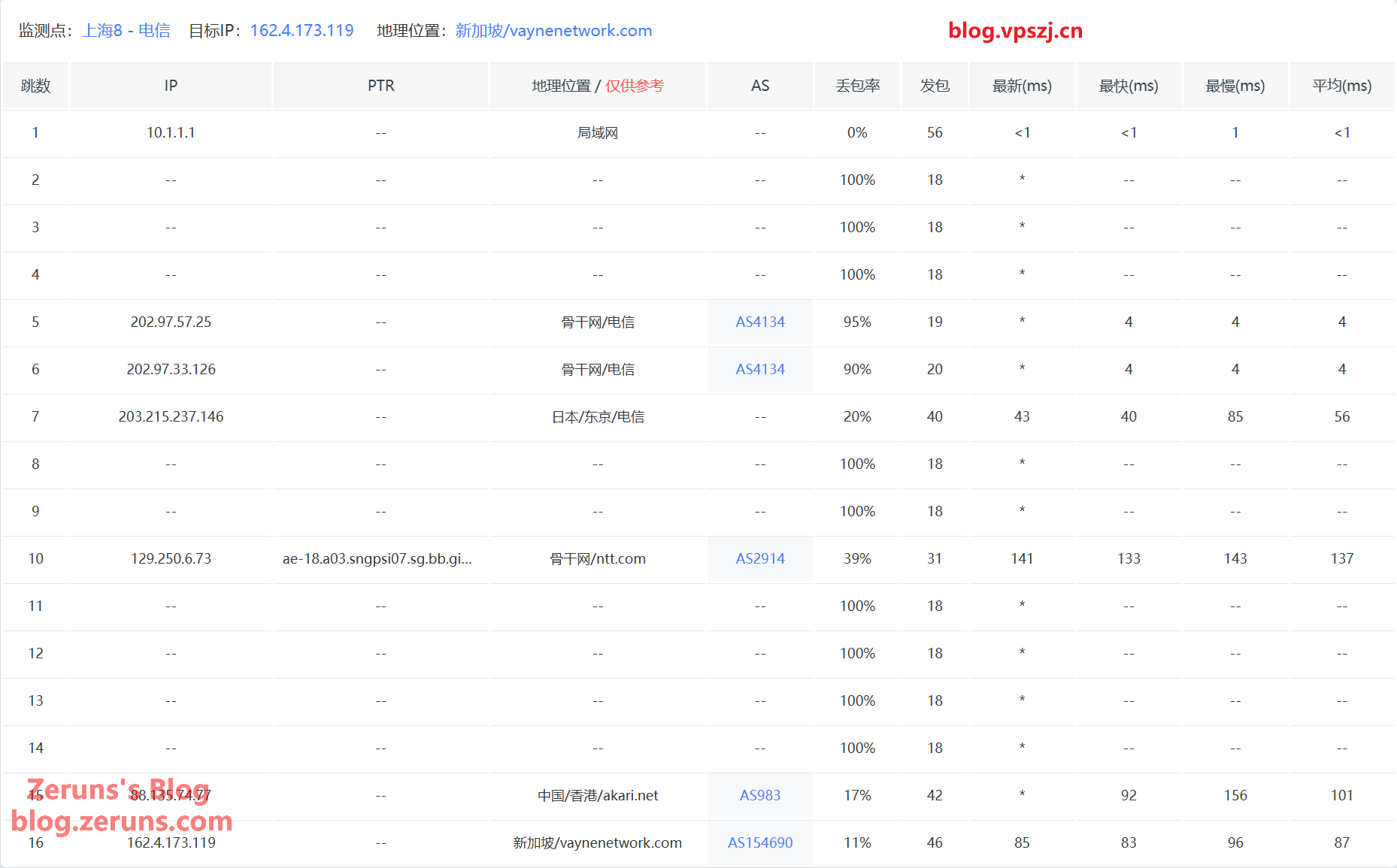
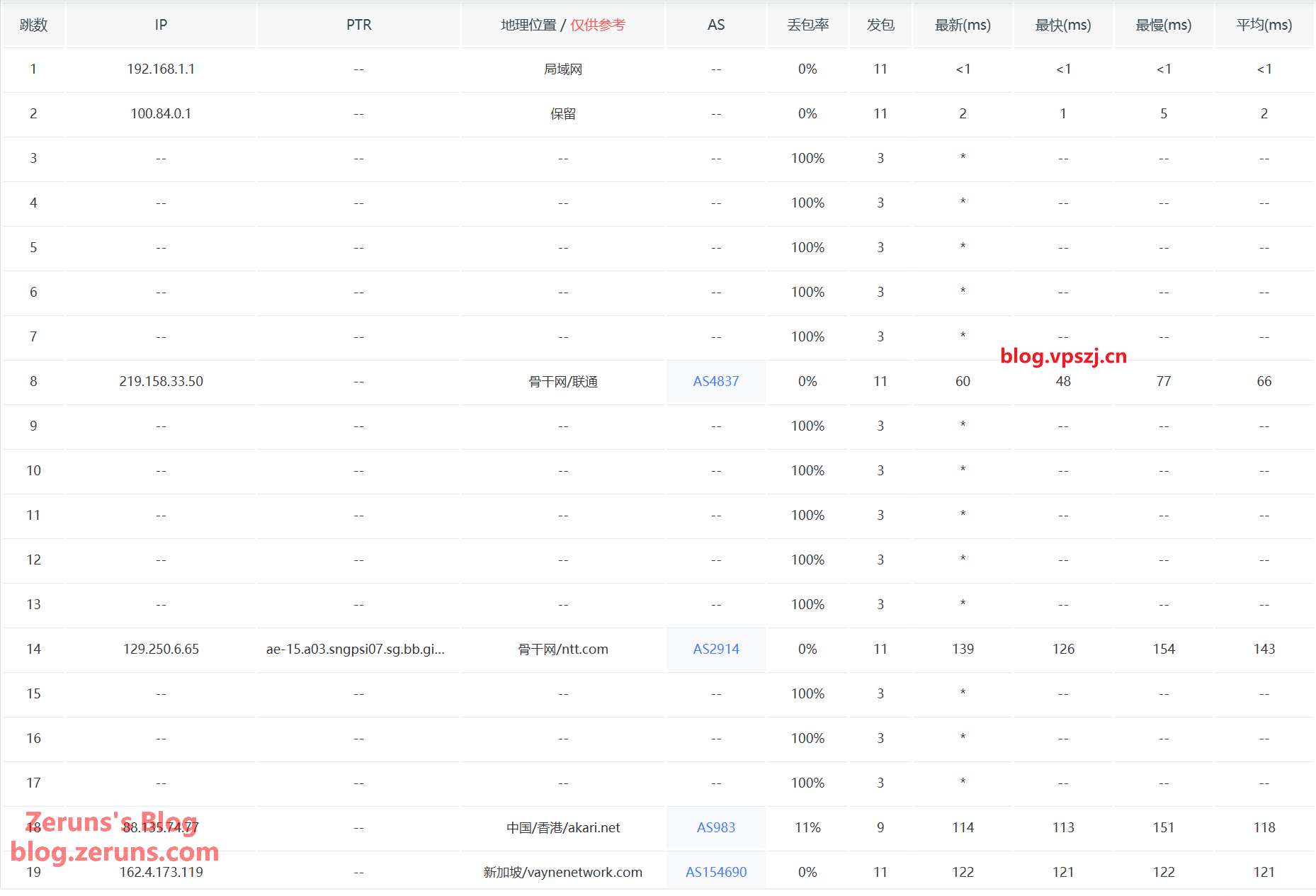
Shanghai Unicom outbound takes Unicom 4837 via NTT to Singapore.
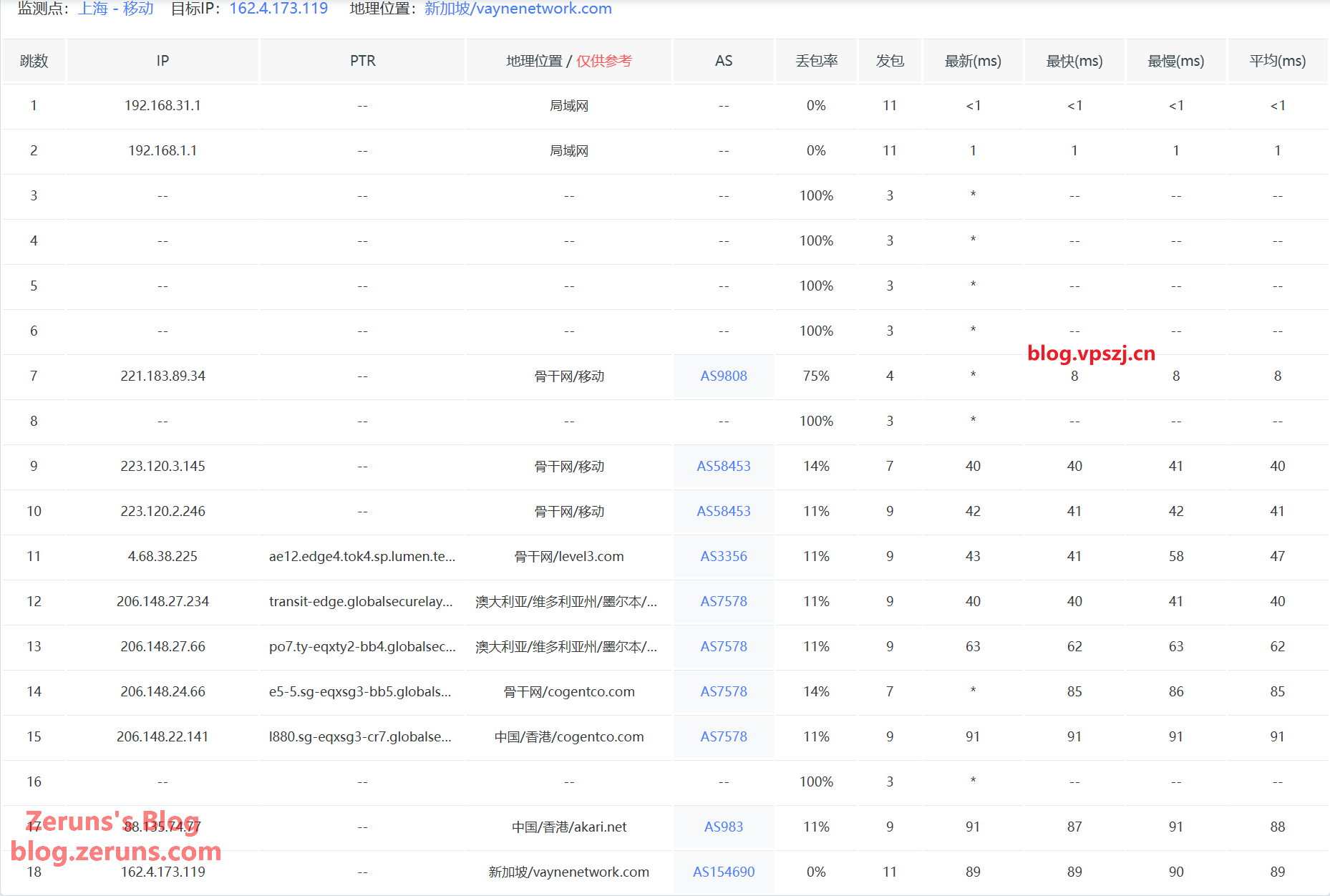
Shanghai Mobile outbound takes Mobile CMI via Level3 to Singapore.
Return Routes
Return route to Guangzhou Telecom: goes back to China directly via akari (AS983).
广州电信 58.60.188.222
5.69 ms         AS154690 新加坡 VAYNE NETWORK PTE. LTD.
1.75 ms         AS983 中国 香港 akari.hk
106.93 ms       AS134774 [CHINANET-GD] 中国 广东 深圳 chinatelecom.cn 电信
Return route to Guangzhou Unicom: goes back to China directly via akari (AS983) and then Telecom 163 (AS4134).
广州联通 210.21.196.6
0.38 ms         AS154690 新加坡 VAYNE NETWORK PTE. LTD.
1.69 ms         AS983 中国 香港 akari.hk
120.11 ms       AS4134 [CHINANET-BB] 中国 广东 广州 en.chinatelecom.com.cn
112.72 ms       AS17623 [APNIC-AP] 中国 广东 深圳 chinaunicom.cn 联通
120.11 ms       AS17623 中国 广东 深圳 宝安区 chinaunicom.cn 联通
Return route to Guangzhou Mobile: goes back to China directly via akari (AS983), then Lumen (AS3356) + Mobile CMI.
广州移动 120.196.165.24
0.47 ms         AS154690 新加坡 VAYNE NETWORK PTE. LTD.
1.44 ms         AS983 中国 香港 akari.hk
1.54 ms         AS7578 新加坡 globalsecurelayer.com
3.91 ms         AS3356 新加坡 lumen.com
2.59 ms         AS3356 新加坡 lumen.com
1.72 ms         AS58453 [CMI-INT] 新加坡 cmi.chinamobile.com 移动
83.44 ms        AS58453 [CMI-INT] 新加坡 cmi.chinamobile.com 移动
78.47 ms        AS58453 [CMI-INT] 中国 香港 cmi.chinamobile.com 移动
83.65 ms        AS9808 [CMNET] 中国 广东 广州 I-C chinamobileltd.com 移动
43.87 ms        AS9808 [CMNET] 中国 广东 广州 chinamobileltd.com 移动
48.37 ms        AS9808 [CMNET] 中国 广东 广州 chinamobileltd.com 移动
47.68 ms        AS56040 [APNIC-AP] 中国 广东 深圳 gd.10086.cn 移动
IP Quality Score, Mail Port Availability & Streaming Unlock
---------------流媒体解锁--感谢oneclickvirt/UnlockTests测试----------------
 测试时间:  2026-09-19 13:27:51
 ===========[ IPV4 跨国平台 ]============
 Amazon Prime Video        YES (Region: SG) [Native]
 Apple                     YES (Region: SGP) [Native]
 Bilibili Anime            NO
 BingSearch                YES (Region: WW)
 ChatGPT                   YES (Region: SG) [Native]
 Claude                    Banned
 Coze                      YES (Region: SG)
 DeepSeek                  YES (Region: SG)
 Disney+                   YES (Region: SG) [Native]
 Dola AI                   YES (Region: SG)
 Gemini                    NO
 Google Play Store         NO (Region: CN) [Native]
 GoogleSearch              YES
 Grok                      Banned
 Instagram Licensed Audio  Rate Limited (HTTP 429)
 IQiYi                     YES (Region: SG) [Native]
 Kimi                      YES (Region: CN) [Native]
 KOCOWA                    NO
 MathsSpot                 YES (Region: SG) [Native]
 MetaAI                    YES [Native]
 Microsoft Copilot         YES (Region: SG) [Native]
 Mistral AI                NO (Region: SG)
 Netflix                   YES (Region: SG) [Native]
 Netflix CDN               YES (Region: SG) [Native]
 OneTrust                  YES (Region: SG) [Native]
 ParamountPlus             YES [Native]
 Perplexity AI             Banned
 Poe                       YES (Region: SG) [Via DNS]
 Reddit                    YES
 SonyLiv                   Error
 Sora                      YES (Region: SG)
 Spotify Registration      YES (Region: SG) [Native]
 Steam Store               YES (Community Available) (Region: SG)
 TikTok                    YES (Region: ALISG) [Native]
 TVBAnywhere+              YES (Region: SG) [Native]
 Viu.com                   YES [Native]
 WeTV                      YES (Region: SG) [Native]
 Wikipedia Editability     Banned
 X (formerly Twitter)      YES (Region: SG)
 YouTube CDN               YES (Youtube Video Server) (Region: TSA) [Native]
 YouTube Region            YES (Region: SG) [Native]
 ===========[ IPV6 跨国平台 ]============
 Amazon Prime Video        N/A (No IPv6 Support)
 Apple                     YES (Region: SGP) [Native]
 Bilibili Anime            N/A (No IPv6 Support)
 BingSearch                YES (Region: WW)
 ChatGPT                   YES (Region: SG) [Native]
 Claude                    Banned
 Coze                      N/A (No IPv6 Support)
 DeepSeek                  N/A (No IPv6 Support)
 Disney+                   YES (Region: SG) [Native]
 Dola AI                   N/A (No IPv6 Support)
 Gemini                    NO
 Google Play Store         NO (Region: CN) [Native]
 GoogleSearch              YES
 Grok                      Banned
 Instagram Licensed Audio  Rate Limited (HTTP 429)
 IQiYi                     N/A (No IPv6 Support)
 Kimi                      YES (Region: CN) [Native]
 KOCOWA                    N/A (No IPv6 Support)
 MathsSpot                 N/A (No IPv6 Support)
 MetaAI                    YES [Native]
 Microsoft Copilot         YES (Region: SG) [Native]
 Mistral AI                NO (Region: SG)
 Netflix                   Restricted (Originals Only)
 Netflix CDN               YES (Region: SG) [Native]
 OneTrust                  YES (Region: SG) [Native]
 ParamountPlus             YES [Native]
 Perplexity AI             Banned
 Poe                       N/A (No IPv6 Support)
 Reddit                    N/A (No IPv6 Support)
 SonyLiv                   Error
 Sora                      YES (Region: SG)
 Spotify Registration      YES (Region: SG) [Native]
 Steam Store               N/A (No IPv6 Support)
 TikTok                    N/A (No IPv6 Support)
 TVBAnywhere+              N/A (No IPv6 Support)
 Viu.com                   N/A (No IPv6 Support)
 WeTV                      YES (Region: SG) [Native]
 Wikipedia Editability     Banned
 X (formerly Twitter)      Error
 YouTube CDN               YES (Youtube Video Server) (Region: SIN) [Native]
 YouTube Region            YES (Region: SG) [Native]
---------------------TikTok解锁--感谢lmc999的源脚本---------------------
 Tiktok Region:         【SG】(可能为IDC IP)
-------------IP质量检测--基于oneclickvirt/securityCheck使用--------------
数据仅作参考,不代表100%准确,如果和实际情况不一致请手动查询多个数据库比对
以下为各数据库编号,输出结果后将自带数据库来源对应的编号
ipinfo数据库  [0] | scamalytics数据库 [1] | virustotal数据库   [2] | abuseipdb数据库   [3] | ip2location数据库    [4]
ip-api数据库  [5] | ipwhois数据库     [6] | ipregistry数据库   [7] | ipdata数据库      [8] | db-ip数据库          [9]
ipapiis数据库 [A] | ipapicom数据库    [B] | bigdatacloud数据库 [C] | dkly数据库        [D] | ipqualityscore数据库 [E]
ipintel数据库 [F] | ipfighter数据库   [G] | fraudlogix数据库   [H] | cloudflare数据库  [I] |
IPV4:
安全得分:
信任得分(越高越好): 100 [8]
VPN得分(越低越好): 0 [8]
代理得分(越低越好): 0 [8]
社区投票-无害: 0 [2]
社区投票-恶意: 0 [2]
威胁得分(越低越好): 0 [8]
欺诈得分(越低越好): 65 [E]
滥用得分(越低越好): 0 [3]
威胁级别: low [B]
流量占比: 真人(越高越好)63% [I] 机器人(越低越好)36% [I]
黑名单记录统计:(有多少黑名单网站有记录):
无害记录数: 0 [2]  恶意记录数: 0 [2]  可疑记录数: 0 [2]  无记录数: 89 [2]
安全信息:
使用类型: hosting [0 3 7] unknown [C]
公司类型: hosting [0 7]
浏览器类型: 主流85% 其他14% [I]
设备类型: 桌面87% 移动12% 其他0% [I]
操作系统类型: 主流98% 其他1% [I]
是否云提供商: Yes [7 D]
是否数据中心: Yes [0] No [5 8 C]
是否移动设备: Yes [E] No [5 C]
是否代理: No [0 4 5 7 8 B C D] Yes [E]
是否VPN: Yes [E] No [0 7 C D]
是否Tor: No [0 3 7 8 B C D E]
是否Tor出口: No [7 D]
是否网络爬虫: No [B E]
是否匿名: No [7 8 D]
是否攻击者: No [7 8 D]
是否滥用者: No [7 8 C D E]
是否威胁: No [7 8 C D]
是否中继: No [0 7 8 C D]
是否Bogon: No [7 8 A C D]
是否机器人: No [E]
DNS-黑名单: 303(Total_Check) 0(Clean) 0(Blacklisted) 0(Other)
IPV6:
安全得分:
滥用得分(越低越好): 0 [3]
威胁级别: low [B]
流量占比: 真人(越高越好)63% [I] 机器人(越低越好)36% [I]
安全信息:
使用类型: hosting [3]
浏览器类型: 主流85% 其他14% [I]
设备类型: 桌面87% 移动12% 其他0% [I]
操作系统类型: 主流98% 其他1% [I]
是否代理: No [B]
是否Tor: No [3 B]
是否网络爬虫: No [B]
是否Bogon: No [A]
DNS-黑名单: 303(Total_Check) 0(Clean) 0(Blacklisted) 303(Other)
Google搜索可行性:NO
------------邮件端口检测--基于oneclickvirt/portchecker开源------------
Platform  SMTP  SMTPS POP3  POP3S IMAP  IMAPS
LocalPort ✔     ✔     ✔     ✔     ✔     ✔
QQ        ✔     ✔     ✔     ✘     ✔     ✘
163       ✔     ✔     ✔     ✘     ✔     ✘
Sohu      ✘     ✘     ✔     ✘     ✔     ✘
Yandex    ✔     ✔     ✔     ✘     ✔     ✘
Gmail     ✔     ✔     ✘     ✘     ✘     ✘
Outlook   ✔     ✘     ✔     ✘     ✔     ✘
Office365 ✔     ✘     ✔     ✘     ✔     ✘
Yahoo     ✘     ✘     ✘     ✘     ✘     ✘
MailCOM   ✘     ✘     ✔     ✘     ✔     ✘
MailRU    ✔     ✔     ✘     ✘     ✔     ✘
AOL       ✘     ✘     ✘     ✘     ✘     ✘
GMX       ✘     ✘     ✔     ✘     ✔     ✘
Sina      ✘     ✘     ✔     ✘     ✔     ✘
Apple     ✘     ✘     ✘     ✘     ✘     ✘
FastMail  ✘     ✘     ✘     ✘     ✘     ✘
ProtonMail✘     ✘     ✘     ✘     ✘     ✘
MXRoute   ✘     ✘     ✔     ✘     ✔     ✘
Namecrane ✘     ✘     ✔     ✘     ✔     ✘
XYAMail   ✘     ✘     ✘     ✘     ✘     ✘
ZohoMail  ✘     ✘     ✘     ✘     ✘     ✘
Inbox_eu  ✘     ✘     ✔     ✘     ✘     ✘
Free_fr   ✘     ✔     ✔     ✘     ✔     ✘
Test script:
curl -L https://gitlab.com/spiritysdx/za/-/raw/main/ecs.sh -o ecs.sh && chmod +x ecs.sh && bash ecs.sh
Network Quality Check Script
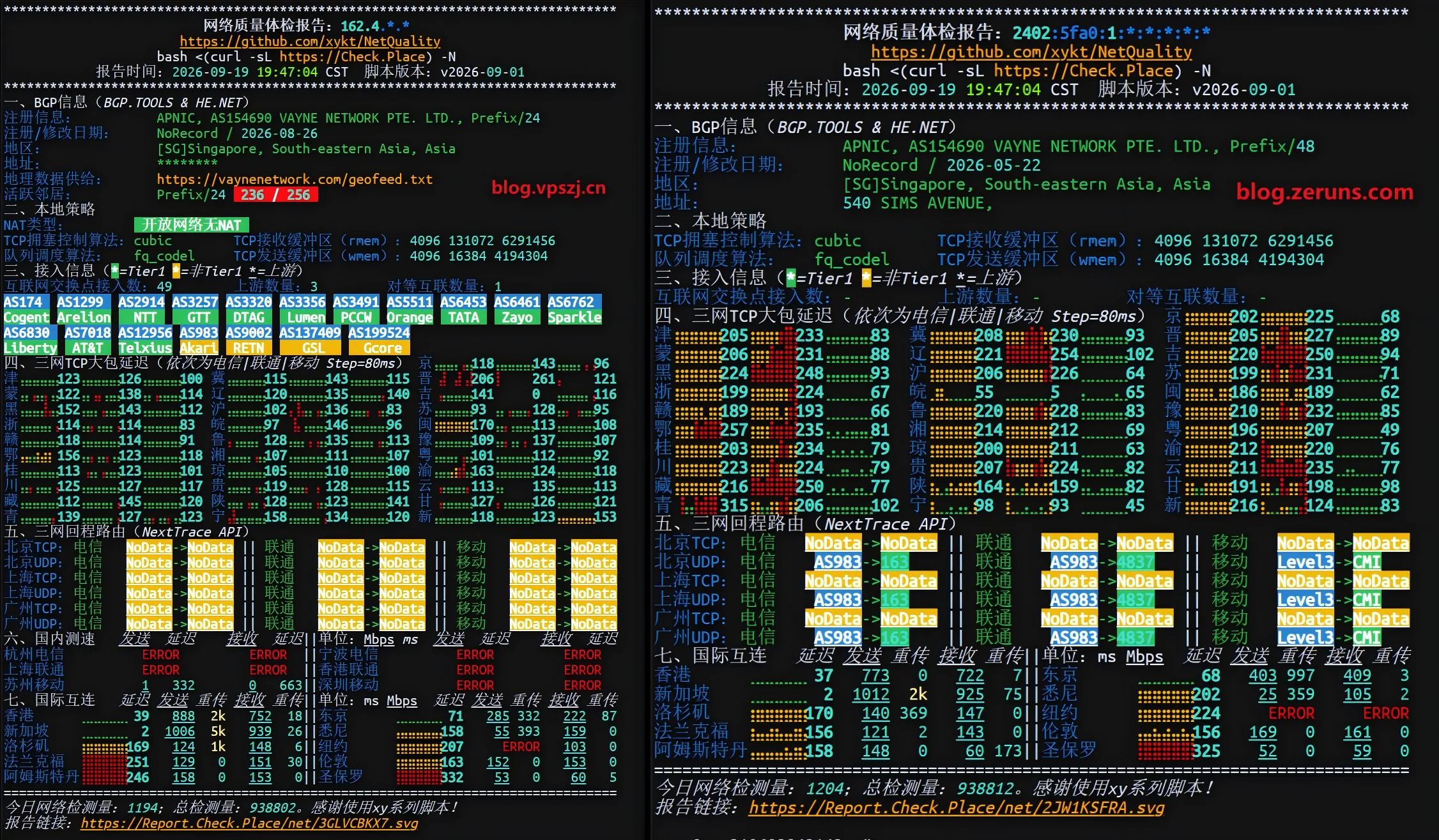
Test script:
# Dual-stack test
bash <(curl -Ls Net.Check.Place)

# IPv4 results only
bash <(curl -Ls Net.Check.Place) -4
Recommended Reading
- Cost-effective and cheap VPS / cloud server recommendations: https://blog.zeruns.com/archives/383.html
- Minecraft server hosting tutorials: https://blog.zeruns.top/tags/minecraft
- Cross-border e-commerce independent site tutorial, WordPress foreign-trade site building guide: https://blog.zeruns.top/archives/64.html
- The complete Hermes Agent deployment guide — build your first AI assistant step by step: https://blog.zeruns.top/archives/90.html
- Ugreen DXP4800Pro NAS unboxing, review, and teardown: https://blog.zeruns.top/archives/95.html
- Discourse forum setup tutorial — deploy the Discourse open-source community forum from scratch: https://blog.zeruns.top/archives/79.html
Comment