
RainYun Germany·Frankfurt Zone 1 cloud server, China Unicom optimized: 2 cores / 4GB RAM / 100Mbps bandwidth for 35.28 yuan(CNY)/month; 4 cores / 8GB RAM / 200Mbps bandwidth for 85.68 yuan/month.
This server line comes in two flavors: a high-bandwidth metered plan and a lower-bandwidth unmetered plan. Unused traffic rolls over to the next month, and once you burn through the quota the speed is throttled to 5 Mbps — you can buy traffic add-ons to restore full speed (100 yuan for 1024 GB). The unmetered 2-core/4GB plan has 25 Mbps upload bandwidth at the same price.
About RainYun
RainYun was founded in 2018 and is a Chinese cloud service provider with fully proprietary technology. RainYun is dedicated to offering users cloud products that are simple to use, affordable, and trustworthy. Its main lineup includes cloud servers, bare-metal servers, web hosting, game cloud servers, object storage, CDN content delivery, cloud apps, and other well-regulated cloud services. RainYun is one of the few providers in China that develops its own billing and product management systems in-house; since its founding it has served hundreds of thousands of customers at home and abroad, including students, developers, and enterprises.
It holds the Value-Added Telecom Service Business Licenses (ISP, IDC, and CDN) issued by China's Ministry of Industry and Information Technology (MIIT).
Refunds are available within 7 days, no questions asked (limited to 3 per account), and cloud server / game cloud products can be trialed for one day for just 1 yuan (once per product; a few of the pricier products cost slightly more to trial).
- RainYun signup link with discount: https://rain.zeruns.com/?s=blog-en
- RainYun promo code: zeruns
- Registering with the promo code gets you a 50%-off-first-month coupon, and you can also claim a 20%-off coupon for new purchases from the points mall. The 20%-off coupon stacks with the official 30%-off annual payment discount, for a combined 44% off — the prices quoted in this article's title are after the stacked discount.
More cost-effective server recommendations: https://blog.vpszj.cn/archives/41.html
Tested Plan Specs
Specs of the server reviewed in this article
- CPU: 2 cores
- RAM: 4GB
- Storage: 30GB (expansion: NVMe local disk at 0.4 yuan/GB/month)
- Traffic: 200GB (extra traffic can be topped up at [1024GB for 100 yuan])
- Bandwidth: 100 Mbps upload, 100 Mbps download
- Region: Germany·Frankfurt
- DDoS protection: none
- IP count: 1 IPv4
- Price: 63 yuan/month (50.4 yuan/month with the 20%-off promo code; 423.36 yuan/year when stacked with the 30%-off annual discount)
Extra IPs cost 5 yuan each (the price above includes one)
- RainYun Korea VPS review, 2 cores 4GB 40Mbps for only 32.5 yuan/month, native/residential IP: https://blog.vpszj.cn/archives/2772.html
- Kooya Cloud US CN2 cloud server review, 1 core 1GB 5Mbps for only 14.85 yuan/month: https://blog.zeruns.com/archives/950.html
- LCAYUN Xi'an China Telecom high-defense cloud server, 4 cores 8GB 20Mbps for only 60 yuan/month: https://blog.vpszj.cn/archives/2774.html
- Tencent Cloud Guangzhou Lighthouse VPS performance review, 2 cores 1GB 200Mbps unmetered for only 40 yuan/month: https://blog.vpszj.cn/archives/2512.html
- Beishaoyun Hong Kong Zone A VPS, 2 cores 2GB 10Mbps for only 18 yuan/month, direct routing on all three Chinese carriers: https://blog.zeruns.com/archives/933.html
Server Specs
The CPU is an AMD EPYC 7452
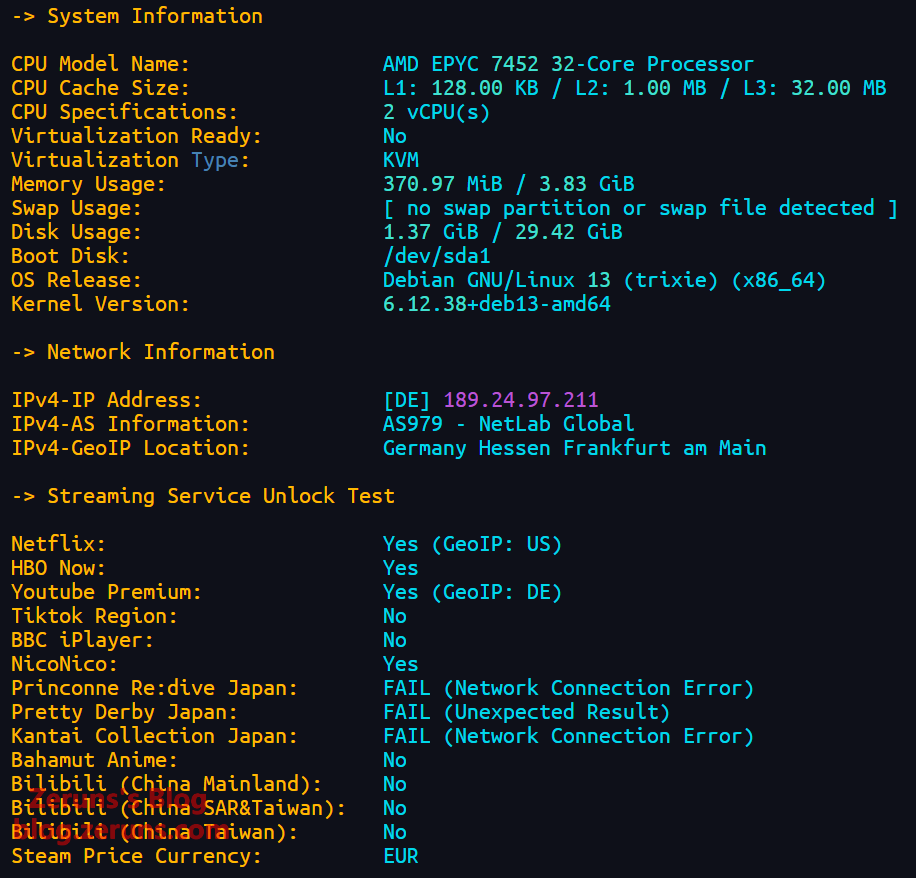
---------------流媒体解锁--感谢oneclickvirt/UnlockTests测试----------------

 Can not detect IPv6 Address

 测试时间:  2026-09-17 21:31:59

 ===========[ IPV4 跨国平台 ]============

 Amazon Prime Video        YES (Region: DE)

 Apple                     YES (Region: DEU)

 Bilibili Anime            YES (Region: DE)

 BingSearch                YES (Region: HK)

 ChatGPT                   YES (Region: DE)

 Claude                    Banned

 Coze                      YES (Region: DE)

 DeepSeek                  YES (Region: DE)

 Disney+                   YES (Region: DE)

 Dola AI                   YES (Region: DE)

 Gemini                    YES (Region: DE)

 Google Play Store         YES (Region: DE)

 GoogleSearch              YES

 Grok                      YES (Region: DE)

 Instagram Licensed Audio  Rate Limited (HTTP 429)

 IQiYi                     YES (Region: DE)

 Kimi                      YES (Region: OVERSEA)

 KOCOWA                    YES

 MathsSpot                 YES (Region: DE)

 MetaAI                    YES

 Microsoft Copilot         YES (Region: DE)

 Mistral AI                Banned (WAF)

 Netflix                   YES (Region: DE)

 Netflix CDN               YES (Region: DE)

 OneTrust                  YES (Region: DE HESSE)

 ParamountPlus             YES

 Perplexity AI             Banned

 Poe                       YES (Region: DE)

 Reddit                    YES

 SonyLiv                   Error

 Sora                      YES (Region: DE)

 Spotify Registration      YES (Region: DE)

 Steam Store               YES (Community Available) (Region: DE)

 TikTok                    YES (Region: DE)

 TVBAnywhere+              YES (Region: DE)

 Viu.com                   YES

 WeTV                      YES (Region: DE)

 Wikipedia Editability     Banned

 X (formerly Twitter)      YES (Region: DE)

 YouTube CDN               NO (Youtube Video Server Main Service Unavailable) (Region: IAD)

 YouTube Region            NO

---------------------TikTok解锁--感谢lmc999的源脚本---------------------

 Tiktok Region:         【DE】
Performance Tests
LemonBench
Single-core: 1576.54 points, multi-core: 3075.2 points, multi-thread ratio 1.95x
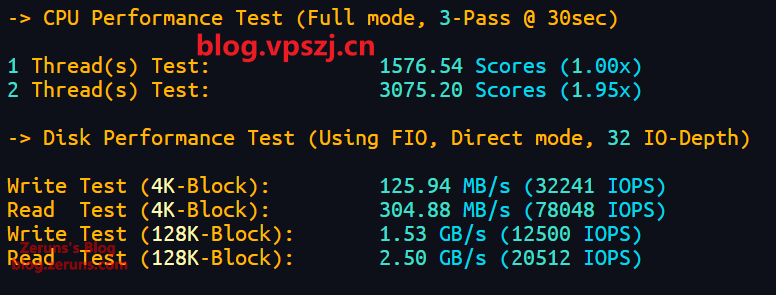
Test script:
bash <(curl -fsSL https://gitee.com/zeruns/Linux-shell/raw/master/benchmark/LemonBench-fixed.sh) -F
CPU-Z
Single-core 354.4 points, multi-core 711.1 points, multi-thread ratio 2.01
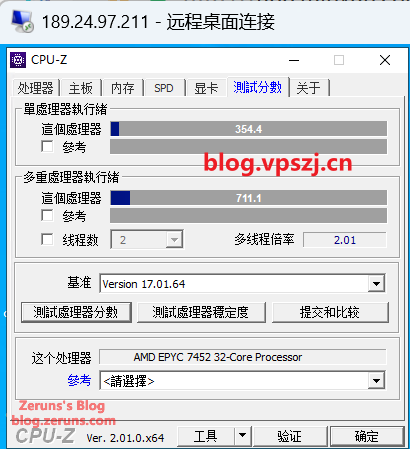
CPU-Z download: https://url.zeruns.com/cpuz
BaoTa Panel Benchmark
Single-core 573 points, multi-core 751 points (the screenshot below is from the new version of the BaoTa benchmark)
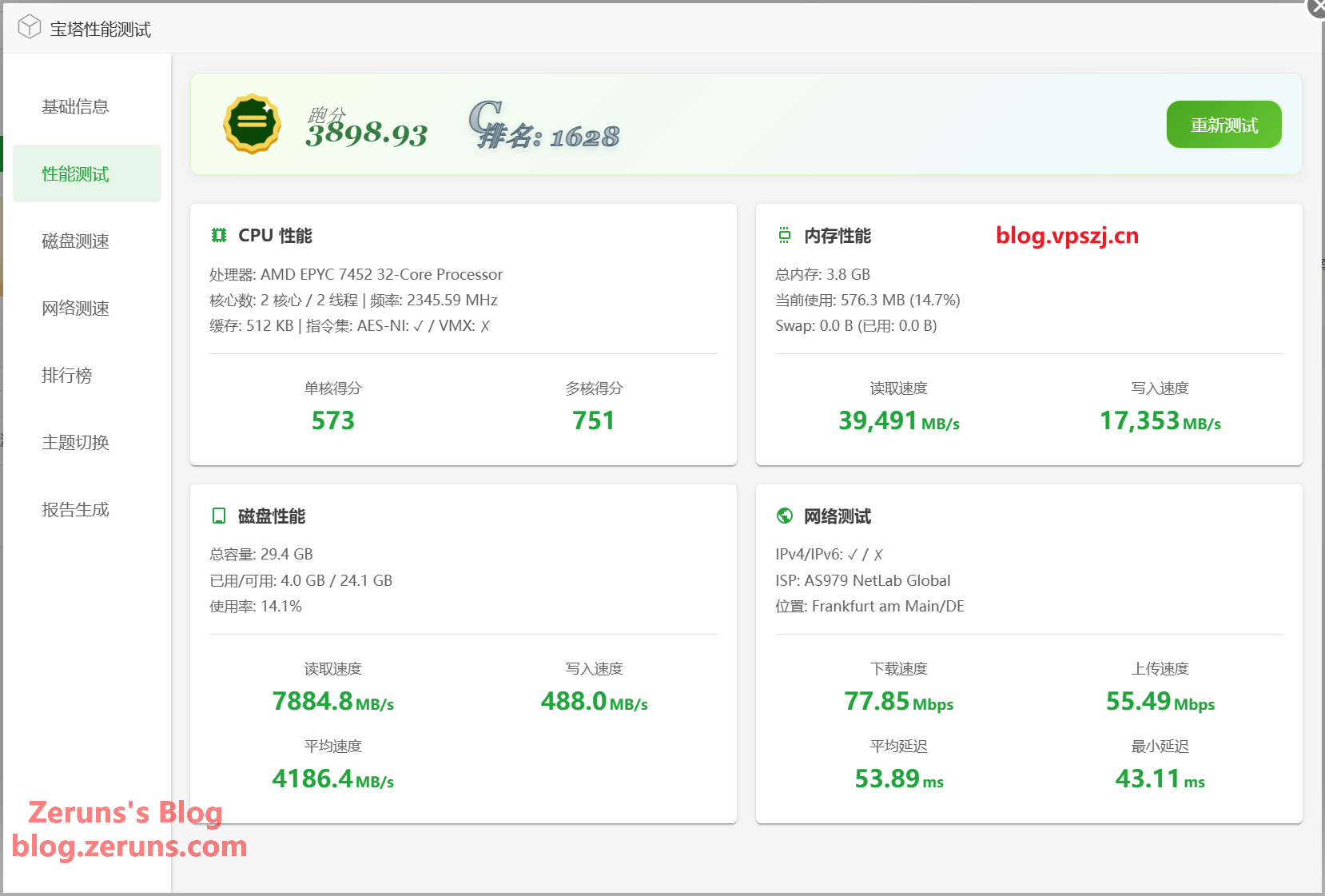
BaoTa install script:
if [ -f /usr/bin/curl ];then curl -sSO https://download.bt.cn/install/install_panel.sh;else wget -O install_panel.sh https://download.bt.cn/install/install_panel.sh;fi;bash install_panel.sh ed8484bec
Unixbench Benchmark
Single-core 1318.4 points, multi-core 2706.4 points
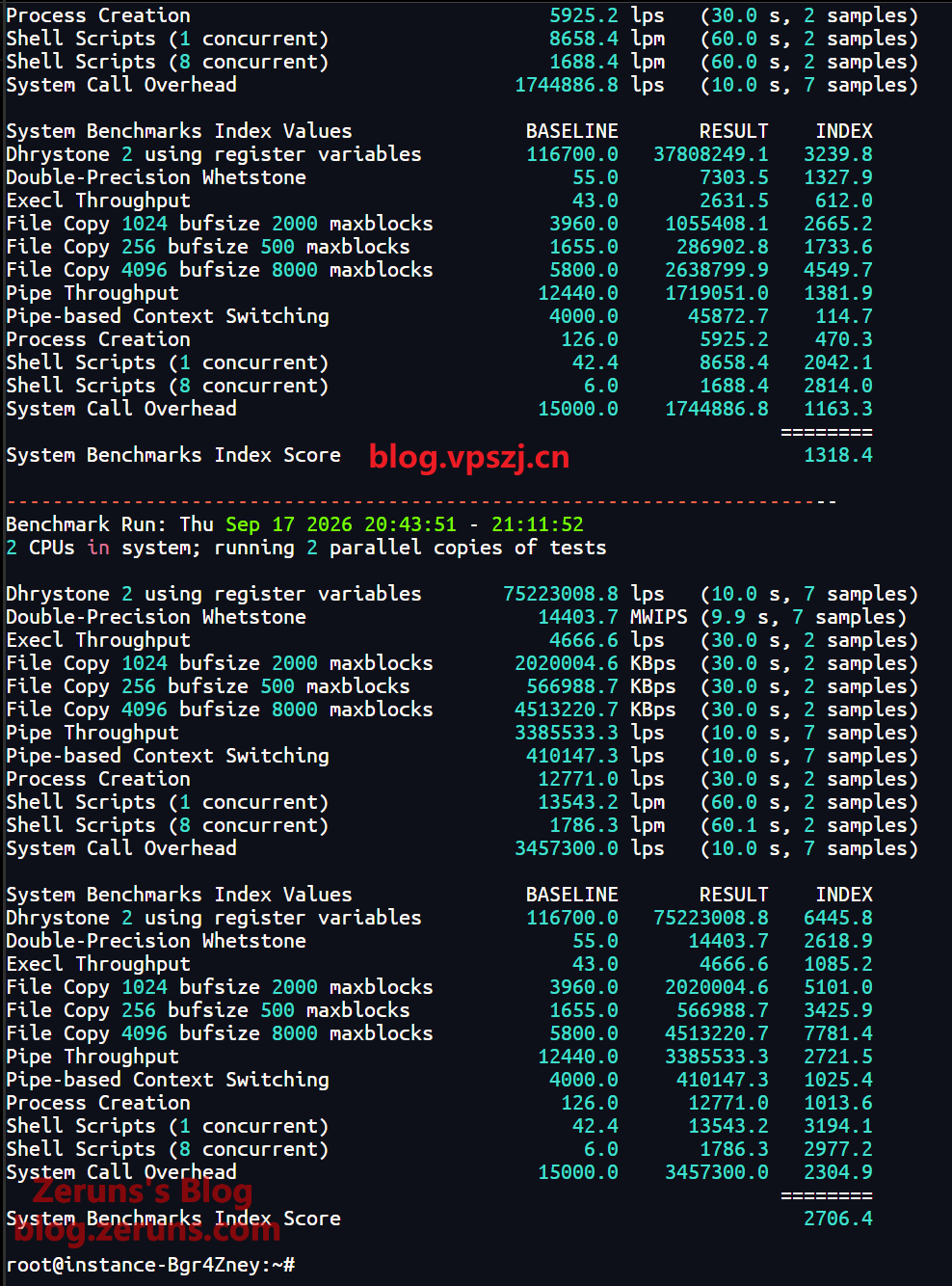
Test script:
wget --no-check-certificate https://gitee.com/zeruns/Linux-shell/raw/master/benchmark/unixbench.sh && chmod +x unixbench.sh && ./unixbench.sh
Geekbench 7
Single-core 943 points, multi-core 1820 points.
Full test report: https://url.zeruns.com/FuanK
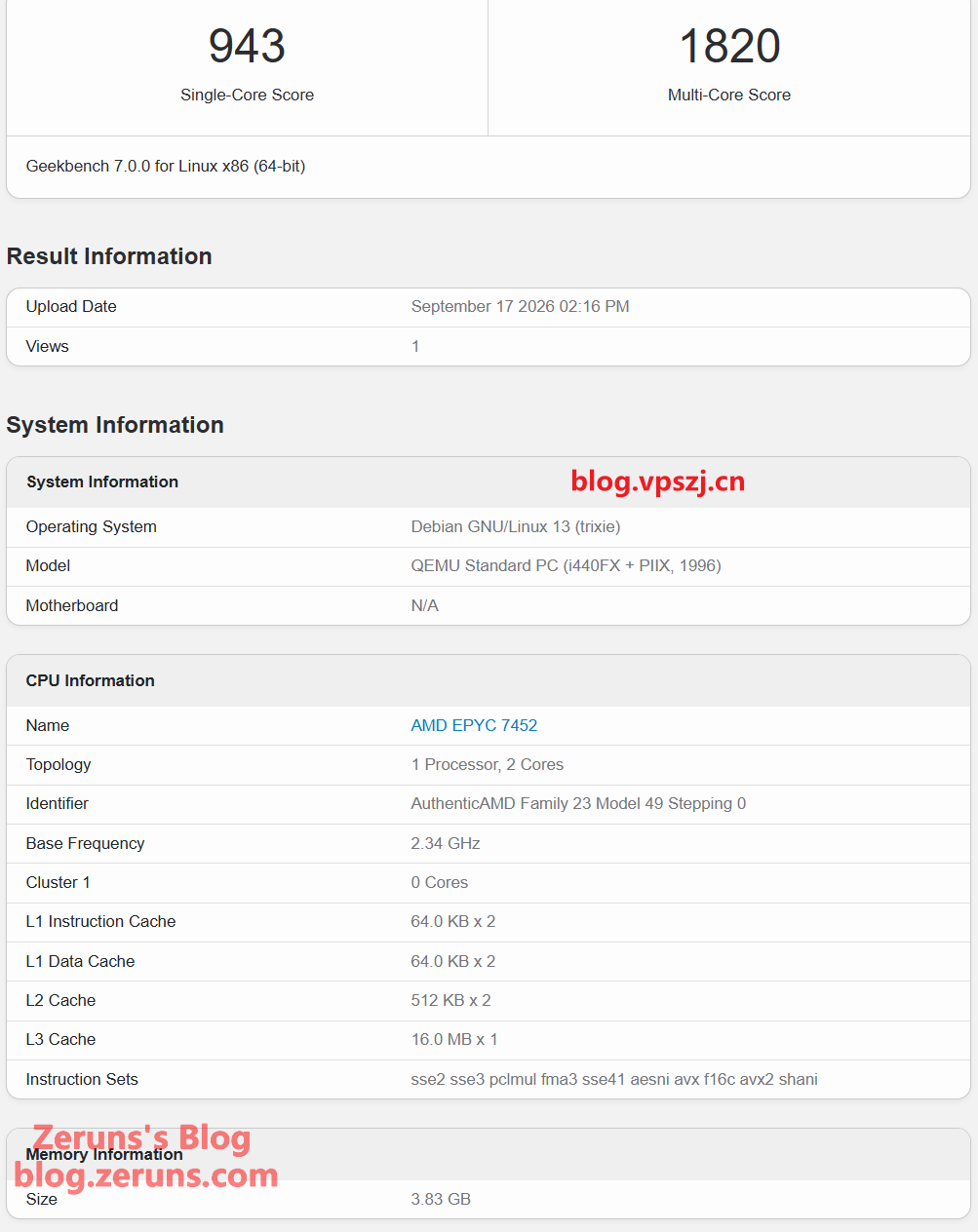
Test script:
wget --no-check-certificate https://geekbench-cdn.b-cdn.net/Geekbench-7.0.0-Linux.tar.gz && tar xf Geekbench-7.0.0-Linux.tar.gz && cd Geekbench-7.0.0-Linux && ./geekbench_x86_64
Geekbench 6
Full test report: https://url.zeruns.com/P2zUt
Single-core 1125 points, multi-core 2001 points.
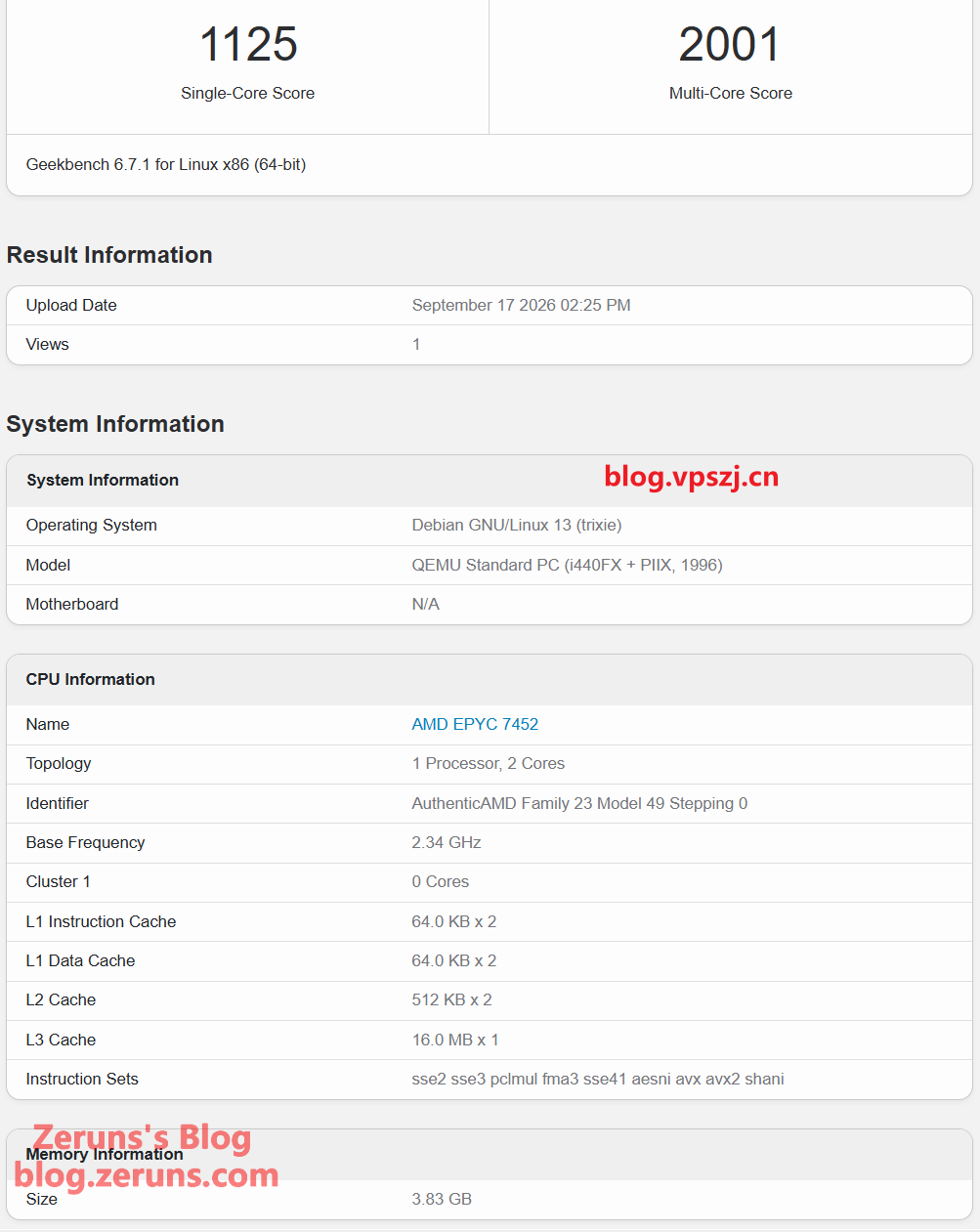
Test script:
wget --no-check-certificate https://cdn.geekbench.com/Geekbench-6.7.1-Linux.tar.gz && tar xf Geekbench-6.7.1-Linux.tar.gz && cd Geekbench-6.7.1-Linux && ./geekbench_x86_64

# ARM version

wget https://img.zeruns.com/down/Geekbench-6.1.0-LinuxARMPreview.tar.gz && tar xf Geekbench-6.1.0-LinuxARMPreview.tar.gz && cd Geekbench-6.1.0-LinuxARMPreview && ./geekbench_aarch64
ServerReview
Benchmark started on 17-Sep-2026 22:30:01

 ## System Information

 OS Name     : Debian GNU/Linux 13 (trixie) (64 bit)

 Kernel      : KVM / 6.12.38+deb13-amd64

 Hostname    : instance-Bgr4Zney

 CPU Model   : AMD EPYC 7452 32-Core Processor

 CPU Cores   : 2 cores @  2345.592 MHz

 CPU Cache   : 512 KB

 Total RAM   : 3921 MiB (Free 3554 MiB)

 Total SWAP  : SWAP not enabled

 Total Space : 32GB (10% used)

 Running for : 3hrs 8min 5sec

 ## CDN Speedtest

 CacheFly :   7.32 MiB/s |   58.57 Mbps  | ping 219.909ms

 Gdrive   :   4.34 KiB/s |    0.03 Mbps  | ping   0.715ms

 ## North America Speedtest

 Softlayer, Washington, USA :       0 B/s |      N/A       | ping error!

 SoftLayer, San Jose, USA   :ping: speedtest.sjc01.softlayer.com: Name or service not known

       0 B/s |      N/A       | ping error!

 SoftLayer, Dallas, USA     :ping: speedtest.dal01.softlayer.com: Name or service not known

       0 B/s |      N/A       | ping error!

 Vultr, New Jersey, USA     : 780.88 KiB/s |    6.10 Mbps  | ping  91.080ms

 Vultr, Seattle, USA        :   7.74 MiB/s |   61.95 Mbps  | ping 161.891ms

 Vultr, Dallas, USA         : 500.50 KiB/s |    3.91 Mbps  | ping 136.572ms

 Vultr, Los Angeles, USA    :   7.54 MiB/s |   60.35 Mbps  | ping 156.675ms

 Ramnode, New York, USA     :ping: lg.nyc.ramnode.com: Name or service not known

       0 B/s |      N/A       | ping error!

 Ramnode, Atlanta, USA      :     534 B/s |      N/A       | ping 112.128ms

 OVH, Beauharnois, Canada   :ping: bhs.proof.ovh.net: Name or service not known

       0 B/s |      N/A       | ping error!

 ## Europe Speedtest

 Vultr, London, UK            :  11.67 MiB/s |   93.37 Mbps  | ping  21.314ms

 LeaseWeb, Frankfurt, Germany :   3.19 MiB/s |   25.55 Mbps  | ping   0.709ms

 Hetzner, Germany             :ping: speed.hetzner.de: No address associated with hostname

       0 B/s |      N/A       | ping error!

 Ramnode, Alblasserdam, NL    :ping: lg.nl.ramnode.com: Name or service not known

       0 B/s |      N/A       | ping error!

 Vultr, Amsterdam, NL         :  11.85 MiB/s |   94.84 Mbps  | ping   7.541ms

 EDIS, Stockholm, Sweden      :   3.65 KiB/s |    0.03 Mbps  | ping  20.270ms

 OVH, Roubaix, France         :   6.62 KiB/s |    0.05 Mbps  | ping  10.596ms

 Online, France               :  11.82 MiB/s |   94.59 Mbps  | ping   9.495ms

 Prometeus, Milan, Italy      :   1.80 KiB/s |    0.01 Mbps  | ping   9.436ms

 ## Exotic Speedtest

 Sydney, Australia     :   2.44 MiB/s |   19.50 Mbps  | ping 294.046ms

 Lagoon, New Caledonia :     284 B/s |      N/A       | ping 351.349ms

 Hosteasy, Moldova     :   2.16 MiB/s |   17.29 Mbps  | ping  36.942ms

 Prima, Argentina      :   1.07 MiB/s |    8.52 Mbps  | ping error!

 ## Asia Speedtest

 SoftLayer, Singapore :       0 B/s |      N/A       | ping error!

 Linode, Tokyo, Japan :   3.41 MiB/s |   27.28 Mbps  | ping 255.847ms

 Linode, Singapore    :   4.02 MiB/s |   32.19 Mbps  | ping 244.189ms

 Vultr, Tokyo, Japan  :   5.80 MiB/s |   46.36 Mbps  | ping 216.205ms

 ## IO Test

 CPU Speed:

    bzip2 512MB -   113 MB/s

   sha256 512MB -   1.1 GB/s

   md5sum 512MB -   568 MB/s

 Disk Speed (512MB):

   I/O Speed  - 1.4 GB/s

   I/O Direct - 586 MB/s

 RAM Speed (1024MB):

   Avg. write - 1706.7 MB/s

   Avg. read  - 8806.4 MB/s

 Benchmark finished in 90 seconds
Test script:
curl -LsO https://jsdelivr.zeruns.com/gh/sayem314/serverreview-benchmark@master/bench.sh; chmod +x bench.sh && ./bench.sh -a share
Bandwidth Test
Multi-threaded IPv4 speed test results from mainland China across all three major carriers (China Telecom, China Unicom, China Mobile): max download 96.8 Mbps, max upload 71.6 Mbps.
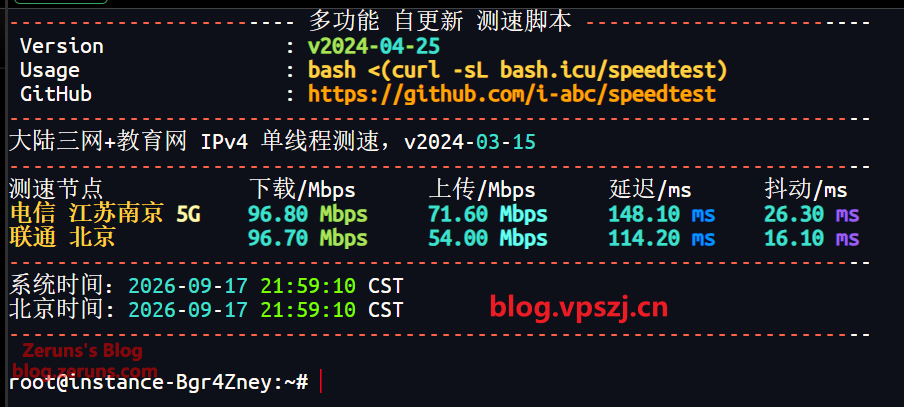
Test script:
bash <(curl -sL https://jsdelivr.zeruns.com/gh/i-abc/Speedtest@master/speedtest.sh)
The Nanjing University speed test node measured: 81.7 Mbps download, 3.07 Mbps upload.
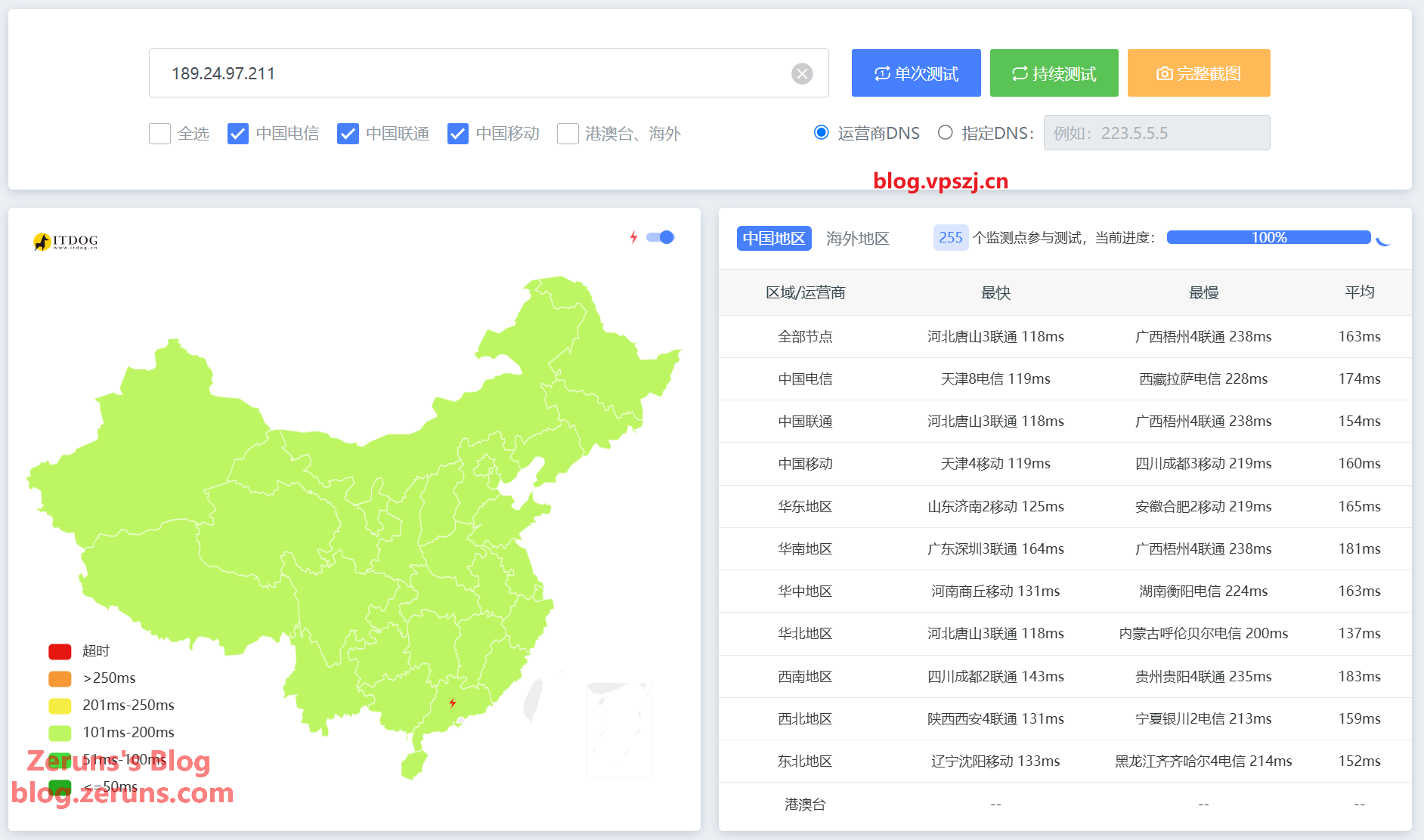
Network Latency
Average latency across the three carriers is 163 ms; the fastest is China Unicom in Tangshan, Hebei at 118 ms.
Network Routing
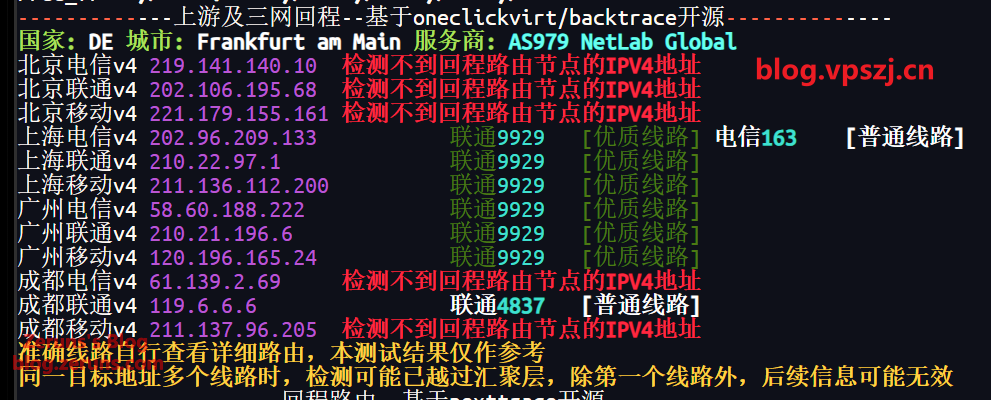
Outbound Routes
Shanghai Telecom outbound goes over the Telecom 163 backbone + Telia, connecting straight through to Germany.
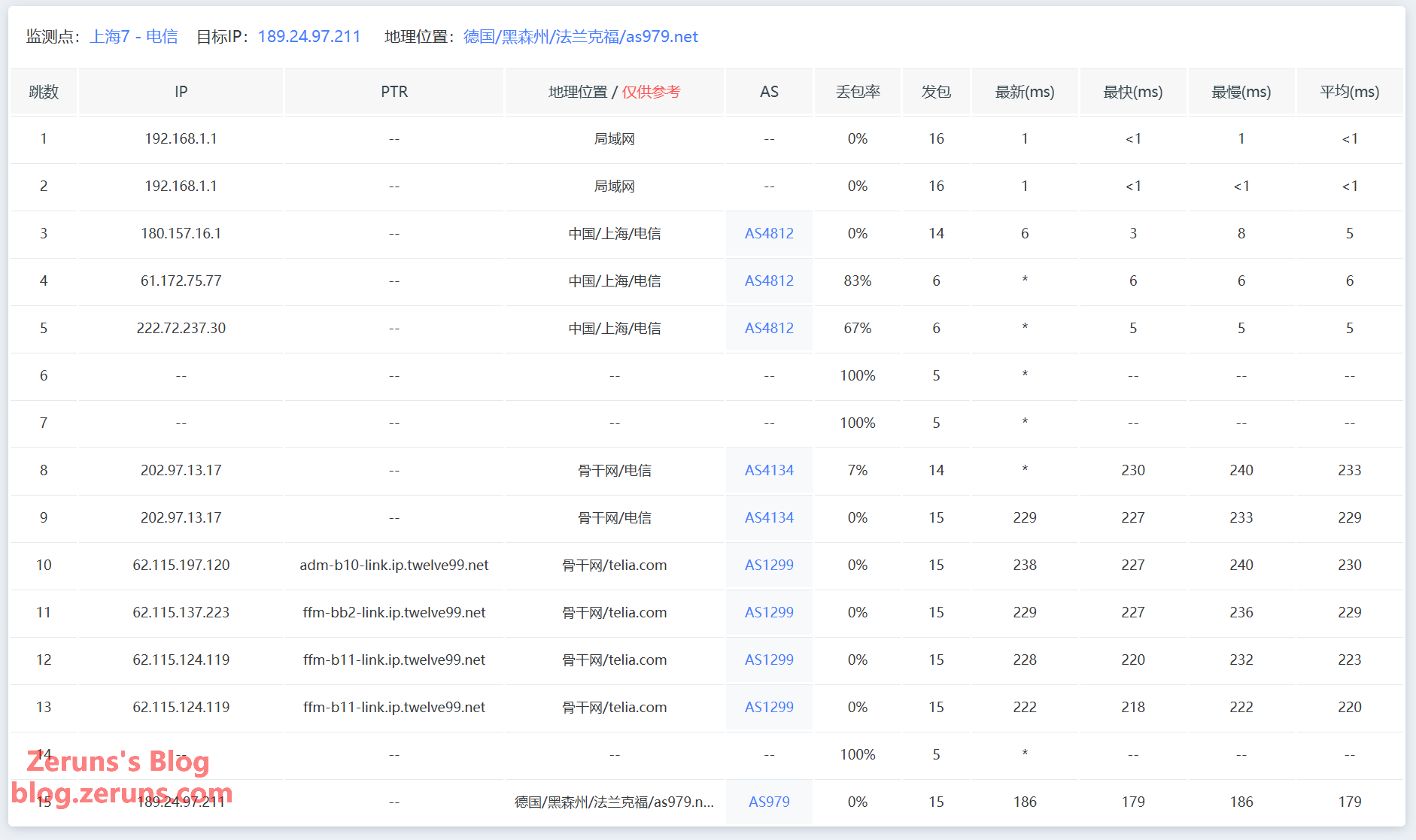
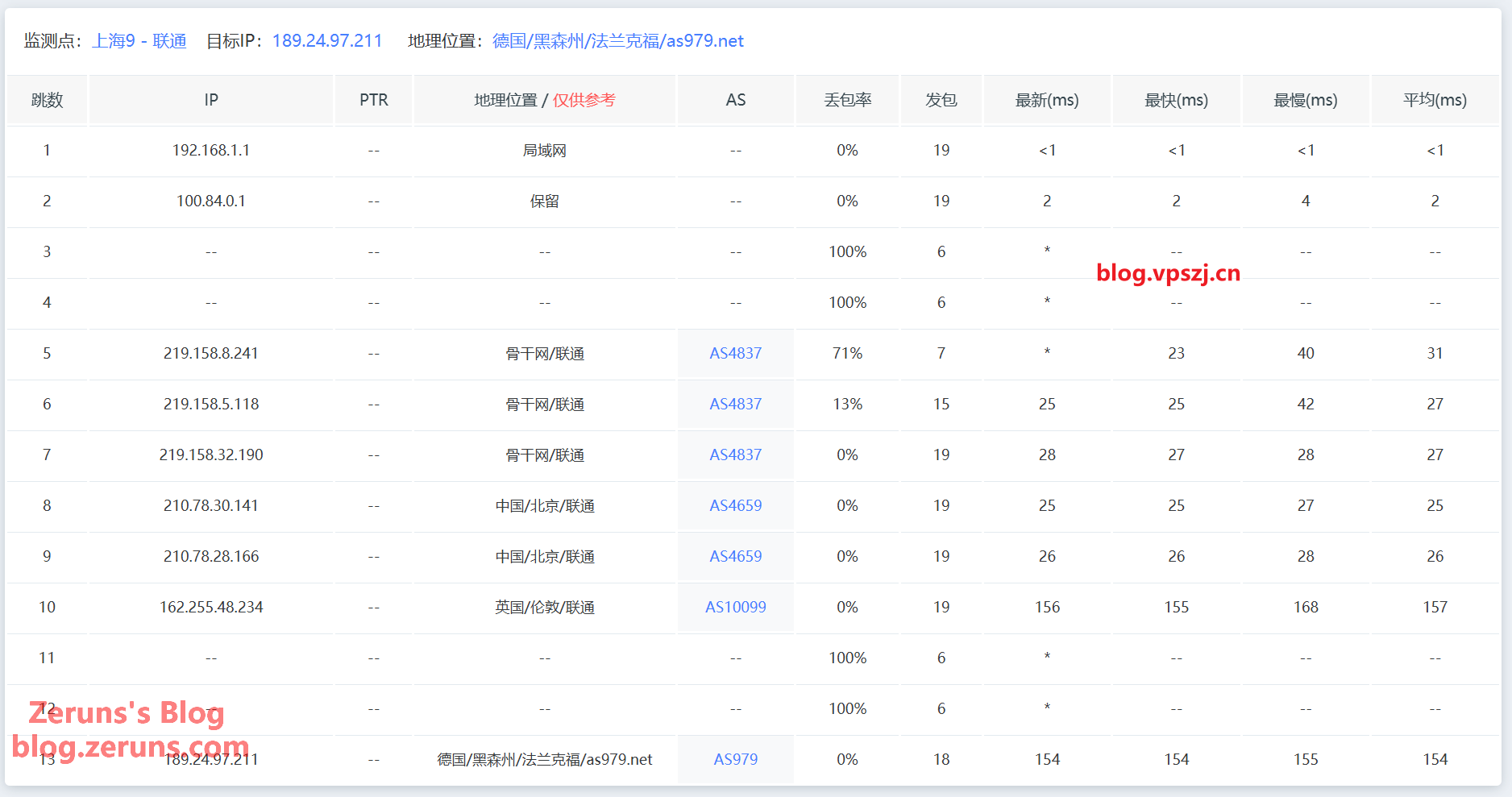
Shanghai Unicom outbound takes the Unicom AS10099 (CUG) route via London to Germany, with 25 ms lower latency than the Telecom route.
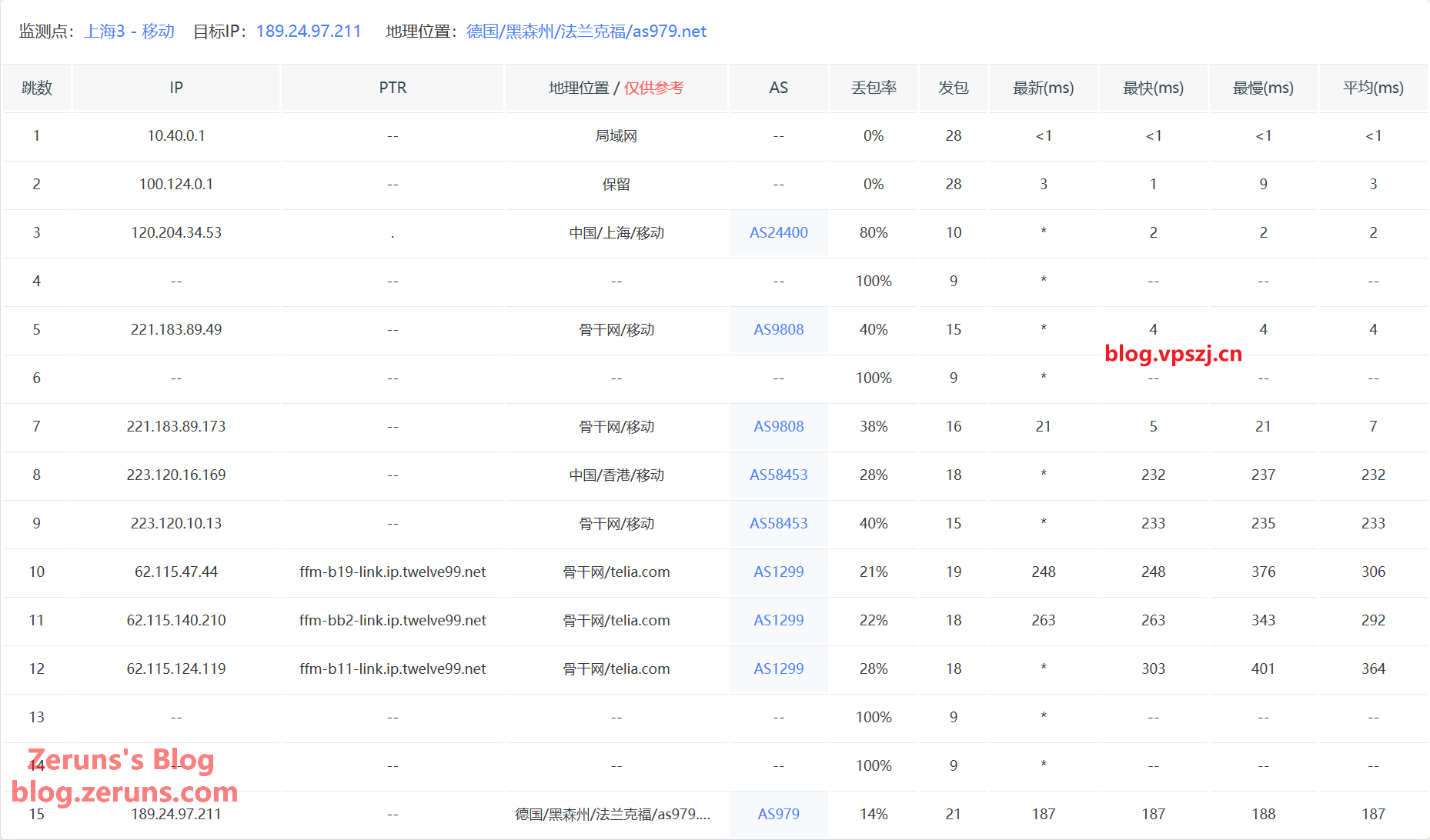
Shanghai Mobile outbound takes the Mobile CMI route via Hong Kong to Germany.
Return Routes
Return route to Guangzhou Telecom: goes back to China directly via Unicom AS10099 + AS9929 (CUP), the premium backbone.
广州电信 58.60.188.222

13.39 ms        AS979 德国 黑森州 美因河畔法兰克福 as979.net

120.14 ms       AS10099 [CUG-BACKBONE] 中国 北京 X-I chinaunicomglobal.com 联通

120.56 ms       * [CNC-BACKBONE] 中国 北京 I-C chinaunicom.cn 联通 CUII

158.79 ms       AS9929 [CNC-BACKBONE] 中国 广东 广州 chinaunicom.cn 联通 CUII

153.14 ms       * [CNC-BACKBONE] 中国 广东 广州

186.05 ms       AS134774 [CHINANET-GD] 中国 广东 深圳 chinatelecom.cn 电信
Return route to Guangzhou Unicom: goes back to China directly via Unicom AS10099 + AS9929 (CUP), the premium backbone.
广州联通 210.21.196.6

18.15 ms        AS979 德国 黑森州 美因河畔法兰克福 as979.net

0.87 ms         * RFC1918

119.96 ms       AS10099 [CUG-BACKBONE] 中国 北京 X-I FRA->PEK chinaunicomglobal.com 联通

112.09 ms       * [CNC-BACKBONE] 中国 北京 I-C chinaunicom.cn 联通 CUII

150.01 ms       AS9929 [CNC-BACKBONE] 中国 广东 广州 chinaunicom.cn 联通 CUII

144.53 ms       * [CNC-BACKBONE] 中国 广东 广州

156.11 ms       AS17816 [UNICOM-GD] 中国 广东省 广州市 中国联通 联通

156.97 ms       AS17623 [APNIC-AP] 中国 广东 深圳 chinaunicom.cn 联通

146.03 ms       AS17623 中国 广东 深圳 宝安区 chinaunicom.cn 联通
Return route to Guangzhou Mobile: goes back to China directly via Unicom AS10099 + AS9929 (CUP), the premium backbone.
广州移动 120.196.165.24

16.13 ms        AS979 德国 黑森州 美因河畔法兰克福 as979.net

1.09 ms         * RFC1918

120.00 ms       AS10099 [CUG-BACKBONE] 中国 北京 X-I FRA->PEK chinaunicomglobal.com 联通

112.10 ms       * [CNC-BACKBONE] 中国 北京 I-C chinaunicom.cn 联通 CUII

150.02 ms       AS9929 [CNC-BACKBONE] 中国 广东 广州 chinaunicom.cn 联通 CUII

144.89 ms       * [CNC-BACKBONE] 中国 广东 广州

187.78 ms       AS4837 [CU169-BACKBONE] 中国 广东 广州 chinaunicom.cn

197.05 ms       AS9808 [CMNET] 中国 广东 广州 chinamobileltd.com 移动

192.60 ms       AS9808 [CMNET] 中国 广东 广州 chinamobileltd.com 移动

191.11 ms       AS56040 [APNIC-AP] 中国 广东 深圳 gd.10086.cn 移动
IP Quality Score & Mail Port Availability
-------------IP质量检测--基于oneclickvirt/securityCheck使用--------------

数据仅作参考,不代表100%准确,如果和实际情况不一致请手动查询多个数据库比对

以下为各数据库编号,输出结果后将自带数据库来源对应的编号

ipinfo数据库  [0] | scamalytics数据库 [1] | virustotal数据库   [2] | abuseipdb数据库   [3] | ip2location数据库    [4]

ip-api数据库  [5] | ipwhois数据库     [6] | ipregistry数据库   [7] | ipdata数据库      [8] | db-ip数据库          [9]

ipapiis数据库 [A] | ipapicom数据库    [B] | bigdatacloud数据库 [C] | dkly数据库        [D] | ipqualityscore数据库 [E]

ipintel数据库 [F] | ipfighter数据库   [G] | fraudlogix数据库   [H] | cloudflare数据库  [I] |

IPV4:

安全得分:

信任得分(越高越好): 99 [8]

VPN得分(越低越好): 0 [8]

代理得分(越低越好): 0 [8]

社区投票-无害: 0 [2]

社区投票-恶意: 0 [2]

威胁得分(越低越好): 2 [8]

欺诈得分(越低越好): 0 [E]

滥用得分(越低越好): 0 [3]

威胁级别: low [B]

流量占比: 真人(越高越好)46% [I] 机器人(越低越好)53% [I]

黑名单记录统计:(有多少黑名单网站有记录):

无害记录数: 0 [2]  恶意记录数: 0 [2]  可疑记录数: 0 [2]  无记录数: 89 [2]

安全信息:

使用类型: hosting [C] Commercial [3] business [0 7]

公司类型: hosting [7] business [0]

浏览器类型: 主流71% 其他28% [I]

设备类型: 桌面73% 移动26% 其他0% [I]

操作系统类型: 主流97% 其他2% [I]

是否云提供商: Yes [7 D]

是否数据中心: Yes [C] No [0 5 8]

是否移动设备: Yes [E] No [5 C]

是否代理: No [0 4 5 7 8 B C D E]

是否VPN: No [0 7 C D E]

是否Tor: No [0 3 7 8 B C D E]

是否Tor出口: No [7 D]

是否网络爬虫: No [B E]

是否匿名: No [7 8 D]

是否攻击者: No [7 8 D]

是否滥用者: No [7 8 C D E]

是否威胁: No [7 8 C D]

是否中继: No [0 7 8 C D]

是否Bogon: No [7 8 A C D]

是否机器人: No [E]

DNS-黑名单: 304(Total_Check) 0(Clean) 9(Blacklisted) 21(Other)

Google搜索可行性:NO

------------邮件端口检测--基于oneclickvirt/portchecker开源------------

Platform  SMTP  SMTPS POP3  POP3S IMAP  IMAPS

LocalPort ✔     ✔     ✔     ✔     ✔     ✔

QQ        ✘     ✔     ✘     ✘     ✘     ✘

163       ✘     ✔     ✘     ✘     ✘     ✘

Sohu      ✘     ✔     ✘     ✘     ✘     ✘

Yandex    ✘     ✔     ✘     ✘     ✘     ✘

Gmail     ✘     ✔     ✘     ✘     ✘     ✘

Outlook   ✘     ✘     ✘     ✘     ✘     ✘

Office365 ✘     ✘     ✘     ✘     ✘     ✘

Yahoo     ✘     ✔     ✘     ✘     ✘     ✘

MailCOM   ✘     ✔     ✘     ✘     ✘     ✘

MailRU    ✘     ✔     ✘     ✘     ✘     ✘

AOL       ✘     ✔     ✘     ✘     ✘     ✘

GMX       ✘     ✔     ✘     ✘     ✘     ✘

Sina      ✘     ✔     ✘     ✘     ✘     ✘

Apple     ✘     ✔     ✘     ✘     ✘     ✘

FastMail  ✘     ✔     ✘     ✘     ✘     ✘

ProtonMail✘     ✘     ✘     ✘     ✘     ✘

MXRoute   ✘     ✘     ✘     ✘     ✘     ✘

Namecrane ✘     ✔     ✘     ✘     ✘     ✘

XYAMail   ✘     ✘     ✘     ✘     ✘     ✘

ZohoMail  ✘     ✔     ✘     ✘     ✘     ✘

Inbox_eu  ✘     ✔     ✘     ✘     ✘     ✘

Free_fr   ✘     ✔     ✘     ✘     ✘     ✘
Test script:
curl -L https://gitlab.com/spiritysdx/za/-/raw/main/ecs.sh -o ecs.sh && chmod +x ecs.sh && bash ecs.sh
Recommended Reading
- Cost-effective and cheap VPS / cloud server recommendations: https://blog.zeruns.com/archives/383.html
- Minecraft server hosting tutorials: https://blog.zeruns.top/tags/minecraft
- Cross-border e-commerce independent site tutorial, WordPress foreign-trade site building guide: https://blog.zeruns.top/archives/64.html
- The complete Hermes Agent deployment guide — build your first AI assistant step by step: https://blog.zeruns.top/archives/90.html
- Ugreen DXP4800Pro NAS unboxing, review, and teardown: https://blog.zeruns.top/archives/95.html
- Discourse forum setup tutorial — deploy the Discourse open-source community forum from scratch: https://blog.zeruns.top/archives/79.html
评论