CommentAI - Typecho Blog AI Intelligent Comment Moderation & Reply Plugin
Introduction
CommentAI is an AI intelligent comment moderation & reply plugin for Typecho blogs.
Core Features
- Automatically use AI to moderate user comments, move rejected comments to pending review for manual approval
- Automatically generate comment replies
- Three working modes available (auto-reply, manual review, suggestion only)
- Support for Qwen, OpenAI, DeepSeek, Kimi and other model settings
- Support for context-aware replies
- Support for sensitive word filtering and frequency limiting
- Support for reply delay
- Support for trigger condition settings
- Support for AI identifier display
Based on the CommentAI plugin developed by blogger xuan, with secondary development using AI, adding comment AI moderation functionality to the original plugin (which only had AI reply functionality).
Original plugin developer's blog post: https://blog.ybyq.wang/archives/1527.html
Open source link for the secondary developed plugin: https://github.com/zeruns/CommentAI
Installation
Environment Requirements
- Typecho 1.2.0 - 1.3.0
- PHP 7.0+ (requires curl, json, mbstring extensions)
- MySQL 5.7+ or SQLite 3.0+
- AI service API Key
Installation Steps
- Upload the
CommentAIfolder to the/usr/plugins/directory - Backend "Console" → "Plugins" → Enable "CommentAI"
- The plugin automatically creates database tables
- If creation fails, manually execute the install.sql file
Configuration
Basic Configuration
Plugin Switch
- Enable/disable the plugin
Reply Mode
- Fully automatic: AI generates and directly publishes
- Manual review: requires manual approval after generation
- Suggestion only: for reference only, not published
Administrator UID
- User identity used for AI replies, default is 1

AI Platform Configuration
Supported Platforms
- Alibaba Cloud Bailian: fast domestic access, affordable price
- OpenAI: high quality, requires international network
- DeepSeek: high cost-performance ratio
- Kimi (Moonshot): domestic large model
- SiliconFlow: one-stop cloud service platform integrating top large models
- DMXAPI: Chinese multimodal large model API aggregation platform
- Custom: support for OpenAI compatible interfaces
API Configuration
- API Key: required, obtain from the corresponding platform
- API Address: optional, leave blank to use default
- Model Name: such as qwen-plus, gpt-4o-mini, deepseek-chat, moonshot-v1-8k

Prompt Configuration
System Prompt
Define the AI's role and reply style:
You are a friendly, professional blogger. Generate appropriate replies based on reader comments.
Requirements:
- Natural, friendly tone
- Provide valuable responses to comment content
- Give clear answers to questions
- Reply length 50-150 words
- Reply in Chinese
Context Information
- Include article title
- Include article summary (increases token consumption)
- Include parent comments

Advanced Configuration
Temperature Parameter
- 0.0-0.3: strong determinism
- 0.4-0.7: balanced (recommended)
- 0.8-1.0: strong creativity
Maximum Token Count
- Recommended 200-500
Sensitive Word Filtering
- One sensitive word per line
Frequency Limit
- Maximum number of calls per hour, 0 for no limit
Reply Delay
- How many seconds to delay reply, 0 for immediate reply (recommended)
- Recommended 30-120 seconds

Display Settings
AI Identifier
- Display: add identifier at the end of reply (recommended, customizable)
- Do not display: looks like manual reply
Trigger Conditions
- Only reply to approved comments (recommended)
- Ignore spam comments (recommended)
- Ignore quotes and Trackback (recommended)
- Only reply to the first comment of the article
- Automatically exclude administrator comments

AI Moderation Configuration
API service provider can be set separately, you can choose a smaller model to save money, or some free models

Usage
Workflow
- Reader posts a comment
- Plugin checks trigger conditions
- Triggers AI moderation
- Delays for specified time (if configured)
- Calls AI to generate reply
- Processes according to mode
Management Panel
Access: Backend → AI Comment Reply
Features
- Statistics cards: display counts for each status
- Status filtering: view replies in different statuses
- Queue list: view detailed information
- Operation buttons: publish, reject, regenerate, view original comment
Toolbar
- Refresh: reload data
- Clean up old records: delete records older than 30 days
- Plugin settings: jump to configuration page
- Test connection: test AI service
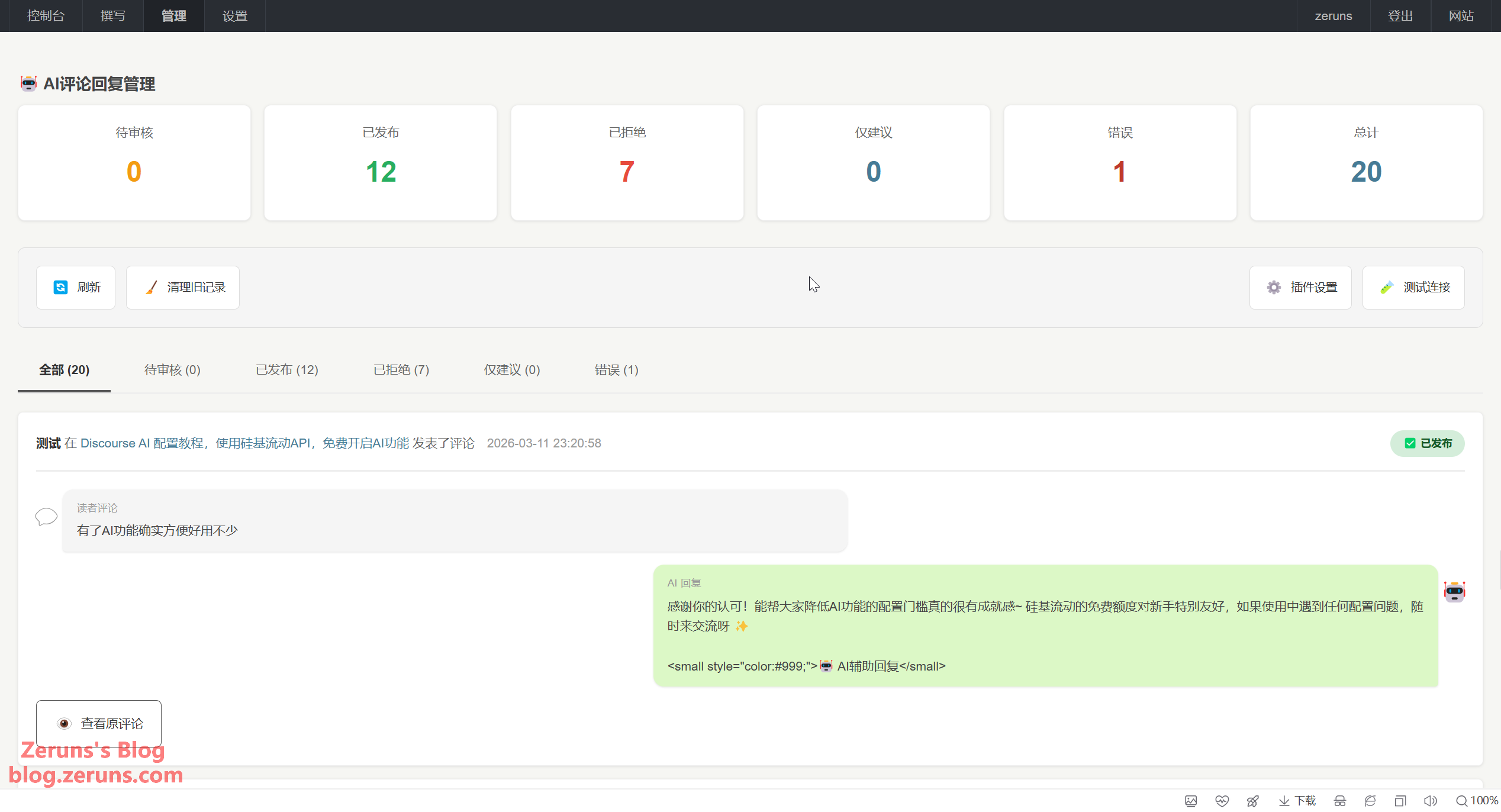
Comment AI moderation effect:


Uninstallation
- Disable the plugin in the backend
- Delete the plugin folder
- (Optional) Delete database table:
DROP TABLE IF EXISTS `typecho_comment_ai_queue`;
Download Links
Github: https://github.com/zeruns/CommentAI
123 Cloud Disk: https://www.123865.com/s/2Y9Djv-5FddH?pwd=ffLm#
Recommended Reading
- Cost-effective and cheap VPS/cloud server recommendations: https://blog.zeruns.com/archives/383.html
- Minecraft server setup tutorial: https://blog.zeruns.com/tag/mc/
- Discourse forum setup tutorial, zero-based deployment of Discourse open source community forum website: https://blog.zeruns.com/archives/919.html
- Minecraft one-click quick server setup tutorial, supporting various MC versions (forge, fabric, paper, bedrock, etc.): https://blog.zeruns.com/archives/923.html
- 【Open Source】 SC8703-based Buck-Boost DCDC Adjustable Power Supply: https://blog.zeruns.com/archives/929.html
- Discourse AI configuration tutorial, using SiliconFlow API, free to enable AI features: https://blog.zeruns.com/archives/917.html
评论