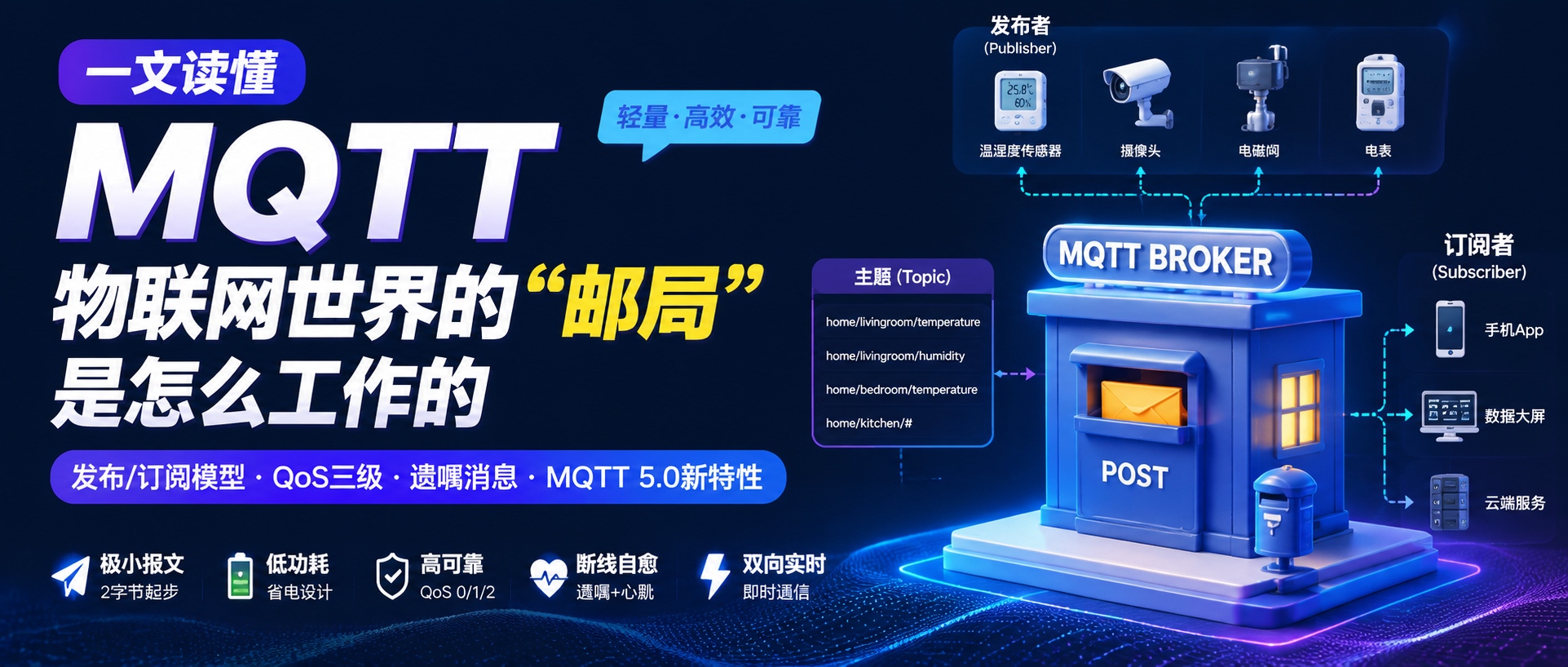
If you've ever worked on an IoT project, chances are you couldn't avoid one word: MQTT. From smart light bulbs in your home to soil sensors out in the fields, from machine tools on the production line to shared bikes by the roadside — billions of devices rely on this protocol, born in 1999, to talk to each other. Why did it become the de facto standard for IoT? And where exactly does it beat HTTP? This article walks you through everything from the publish/subscribe model to the three QoS levels, Last Will messages, and MQTT 5.0's new features — topped off with protocol comparisons and a ready-to-run Python code snippet — to help you wrap your head around MQTT in one go.
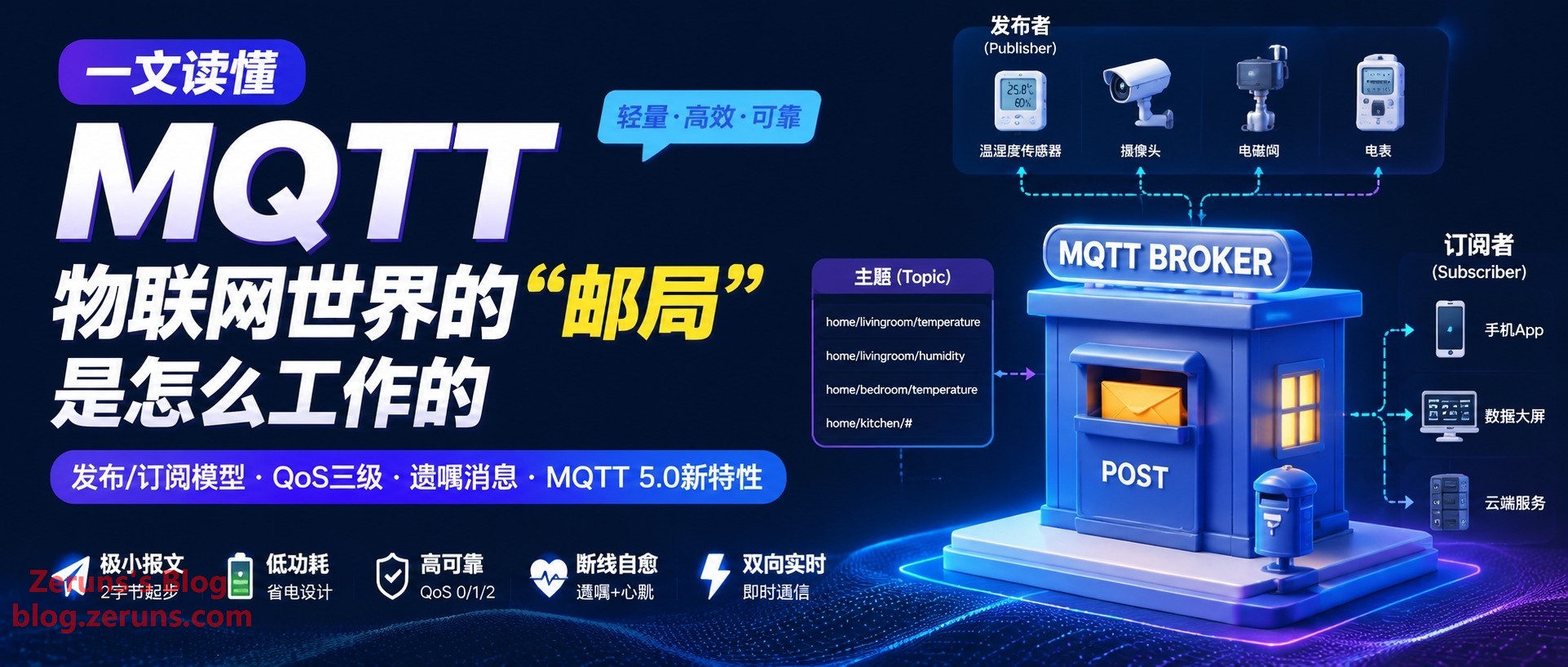
1. Starting from a Smart Greenhouse: Why IoT Can't Just Use HTTP
Picture a typical smart agriculture greenhouse: hundreds of temperature/humidity, light, and soil moisture sensors scattered across the fields, powered by batteries and solar panels, reporting data to the cloud over a flaky 4G connection. The cloud, in turn, needs to remotely control roller shutters, fans, and irrigation valves based on real-time data.
During the solution review, the dev team's first instinct is often: "Just use HTTP — a POST request and we're done." The thinking isn't wrong, but once you're in a real-world scenario with unreliable networks, hundreds or thousands of devices, and a need for 24/7 online presence, HTTP's shortcomings are laid bare:
- The cloud can't push proactively. HTTP is a request/response model. If the cloud wants to send a "turn on the fans to cool things down" command, it has to wait for the device's next poll. Make the polling interval too long, and command latency becomes painful; make it too short, and thousands of devices polling simultaneously will flood the server and network with pointless requests.
- Header overhead is enormous. A single HTTP request's headers alone can run into hundreds of bytes, while the actual data the device needs to transmit might be only a dozen bytes — say, a temperature reading of "26.5." It's like shipping a sticky note in a giant cardboard box.
- Power consumption is unsustainable. Every communication requires a full TCP + TLS handshake. For battery-powered sensors, every extra second the radio module is awake is literally burning money.
This isn't just a problem for agriculture — it's a shared pain point across the entire IoT industry: massive device fleets, unreliable networks, low-power constraints, and bidirectional real-time communication. HTTP was designed for humans browsing the web, not for machines chatting with each other. And MQTT was born precisely for this.
2. What Is MQTT: A Protocol Born to "Save Money"
MQTT originally stood for Message Queuing Telemetry Transport. These days, though, the official line is that it's no longer treated as an acronym — the protocol doesn't actually contain a traditional message queue internally; the name is mostly a historical artifact.
Its origin story tells you a lot. In 1999, IBM's Andy Stanford-Clark and Arlen Nipper of Arcom designed this protocol for a very specific scenario: monitoring oil pipelines stretching across the wilderness via satellite links. Satellite communication was billed by data volume, had extremely narrow bandwidth, and suffered from high latency — while the monitoring equipment along the pipeline ran on batteries. So the design goals were straightforward: keep packets small, keep the protocol power-efficient, and make it resilient when the network drops.
These three simple goals shaped MQTT's DNA, which persists to this day:
- Tiny packets: The minimum fixed header is just 2 bytes — compared to HTTP's text headers that routinely run into hundreds of bytes, it's lean to the extreme.
- Lightweight: Runs on top of TCP (default port 1883, or 8883 for TLS encryption). A microcontroller with just a few dozen KB of memory can run an MQTT client.
- Designed for unreliable networks: Built-in heartbeat, Last Will, and tiered QoS — a complete "disconnect survival" toolkit.
Around 2013, IBM submitted MQTT to the OASIS standards body. In 2014, MQTT 3.1.1 became an official OASIS standard and was later adopted as an ISO international standard (ISO/IEC 20922). The mainstream versions today are MQTT 3.1.1 and MQTT 5.0 (released in 2019). Version 5.0 is the currently recommended version — we'll get to it later.
eeClub — Electronics Engineer Community: https://bbs.eeclub.top/
Electronics/Microcontroller Tech QQ Group: 2169025065
3. Core Architecture: Not a "Phone Call," but a "Newspaper Subscription"
The key to understanding MQTT is understanding its communication model — the Publish/Subscribe pattern.
HTTP's request/response model is like making a phone call: you dial the other party's number and talk directly. Both parties must be online simultaneously and must know each other's "number."
The publish/subscribe model is more like subscribing to a newspaper: the publisher prints the paper and delivers it to the post office (the Broker). You (the subscriber) have pre-registered with the post office saying "I want the tech section." Every day when the paper arrives, the post office delivers it according to the subscription list. The publisher doesn't know who the readers are, and the readers don't need to know the publisher's phone number — the two sides are completely decoupled, with the post office as the sole hub.
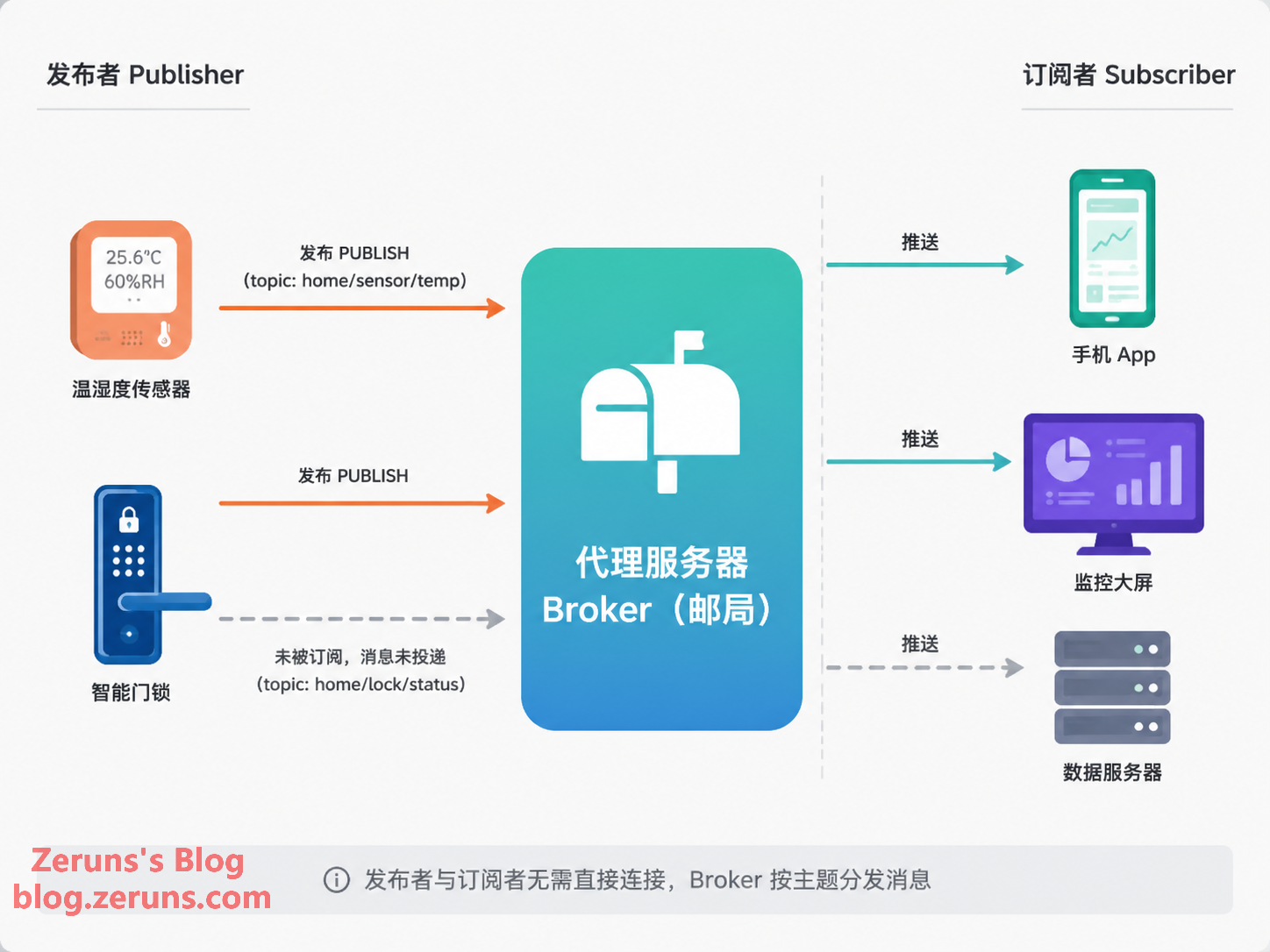
There are three core roles in this model:
- Publisher: The device or program that produces messages — for example, a sensor reporting temperature.
- Broker: The "post office" of the entire system. It receives messages, distributes them to all subscribers by topic, and manages connections, sessions, retained messages, and other housekeeping. It's the only role that needs to be publicly reachable.
- Subscriber: The device or program that cares about certain types of messages — for example, a mobile app or a data dashboard.
It's worth noting that publisher and subscriber are just logical roles. The same device can easily play both parts — a camera might publish alerts to the cloud while also subscribing to control commands sent from the cloud. What's more, since a device only needs to initiate an outbound connection to the Broker, it doesn't need a public IP or any open ports — naturally sidestepping NAT and firewall headaches. This is a major reason MQTT is more popular than approaches where "the device opens a port and waits for connections."
Topic: The "Mailbox Number" in the Post Office
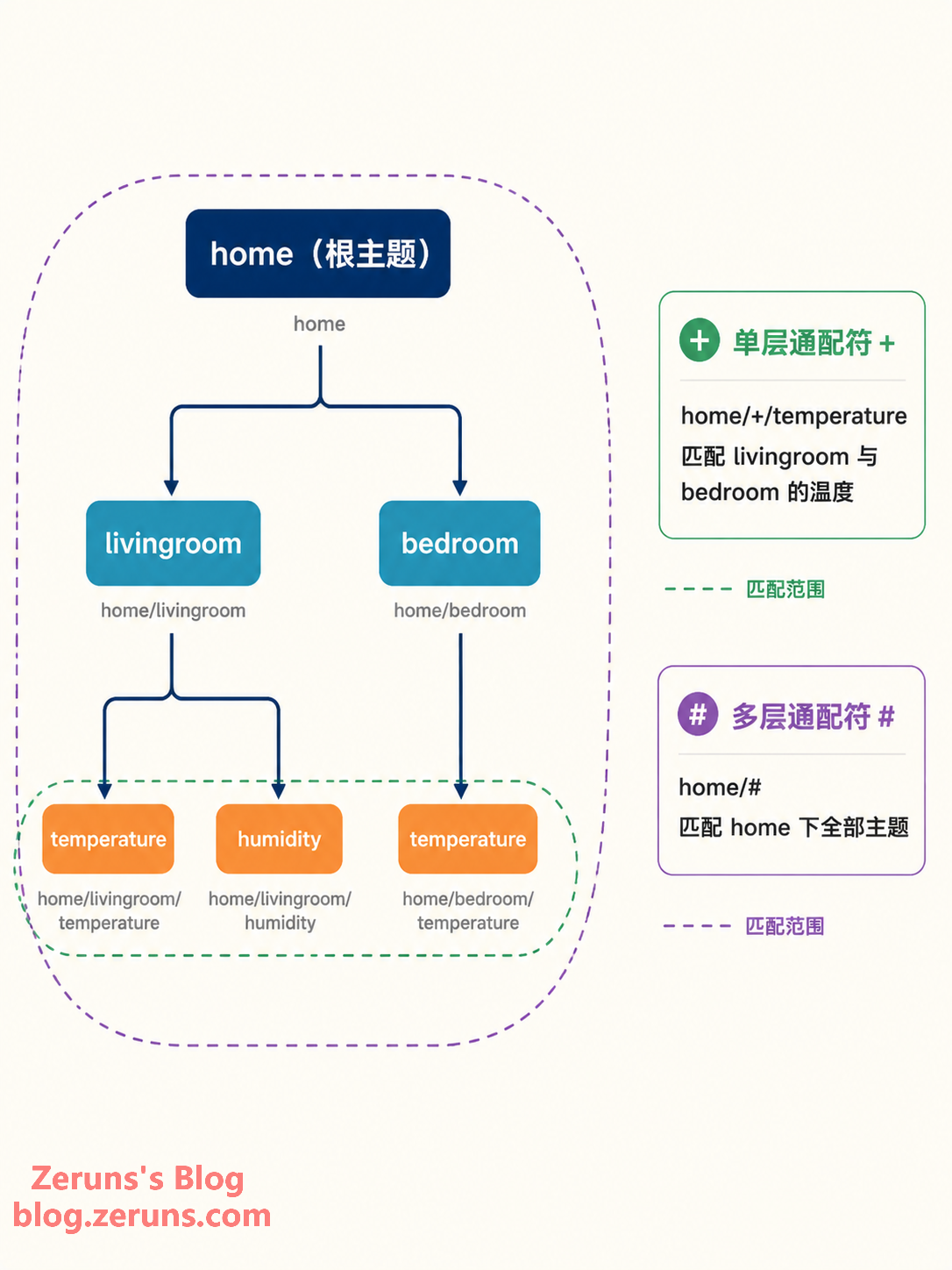
How are messages routed? By Topic. A Topic is a UTF-8 string, hierarchically structured with / separators, resembling a file path:
home/livingroom/temperature
home/livingroom/humidity
home/bedroom/temperature
When subscribing, you can use two types of wildcards:
+single-level wildcard: Matches exactly one level. For example,home/+/temperaturewould receive temperature readings from both the living room and the bedroom.#multi-level wildcard: Matches any number of subsequent levels, but can only appear at the end. For example,home/#would receive all messages under home.
4. Key Features Explained in Depth
MQTT holds its ground in unreliable network environments thanks to a set of elegantly designed mechanisms. The following features are the most frequently tested topics — whether in interviews or in practice.
1. QoS: Three "Delivery Services" for Messages
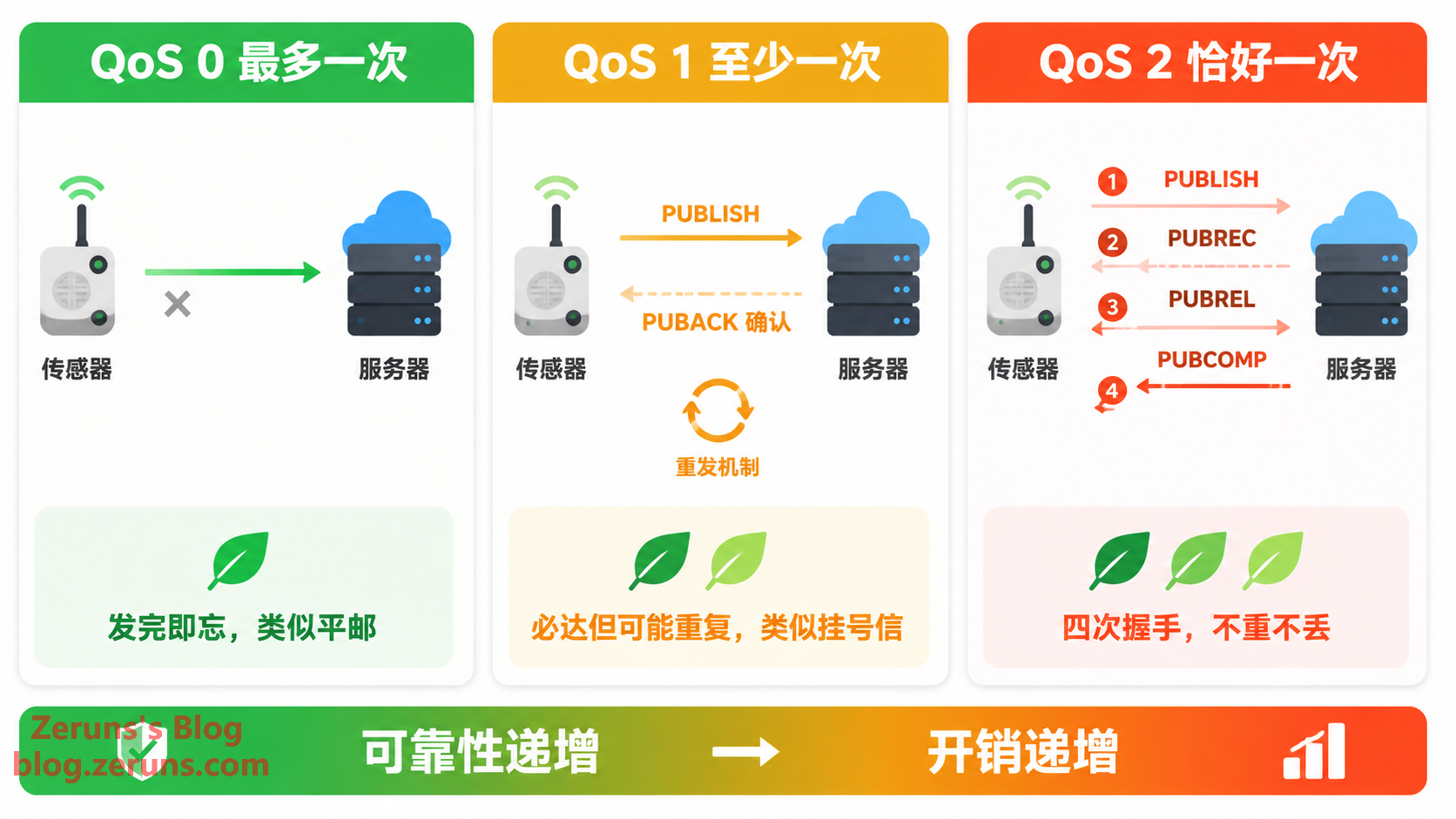
MQTT divides message delivery quality (Quality of Service) into three levels, which you can think of as three types of mail service:
- QoS 0 — At most once: Like regular mail. You send it and forget it — no acknowledgment, no retransmission. Messages may be lost, but never duplicated. Suitable for high-frequency data where losing a reading doesn't matter, like a real-time value reported once per second — lose this frame, and the next one will be along shortly.
- QoS 1 — At least once: Like registered mail. The receiver must respond with a PUBACK acknowledgment, and if the sender doesn't receive it, it retransmits. Delivery is guaranteed, but duplicates may occur — if the acknowledgment packet is lost in transit, the sender will send another copy. Suitable for alerts and state changes where "better to receive it twice than not at all" applies; the receiver should implement idempotent handling.
- QoS 2 — Exactly once: Like a hand-delivered package requiring signatures from both parties. Guaranteed no loss and no duplication through a four-way handshake (PUBREC, PUBREL, PUBCOMP), at the cost of the highest overhead and slowest speed. Suitable for scenarios like billing, where "charging one extra unit is a serious incident."
The rule of thumb is simple: the higher the QoS, the stronger the reliability — but also the greater the overhead and latency. In engineering practice, QoS 1 is often the most cost-effective compromise as the default.
One easily overlooked detail: QoS is declared independently by the publisher and the subscriber, and the Broker delivers at the lower of the two — if the publisher uses QoS 2 but the subscriber only subscribed at QoS 0, the message gets delivered at QoS 0. So when troubleshooting "why did my high-QoS message get lost," remember to check both ends.
2. Retained Messages: A Sticky Note on the Mailbox
Regular messages are "read-once-then-gone" — if a subscriber is offline when the message is sent, it's missed. But when you set the Retain flag on publish, the Broker saves the last retained message for that Topic. Any new subscriber that subsequently subscribes to that topic immediately receives it.
A typical use case: a device publishes its status (like "online" or the current switch state) as a Retained message when it comes online. This way, no matter when the app is opened, it can immediately see the device's latest status — without waiting for the device's next report. Note that only one retained message is stored per topic; a new one overwrites the old. To clear a topic's retained message, simply publish a Retained message with an empty payload to that topic.
3. Last Will and Testament (LWT): The Device's "Last Words"
Last Will and Testament is the most human touch in MQTT. When a client connects to the Broker, it can pre-register: "If I die unexpectedly (abnormal disconnect), please send this message on my behalf."
For example, a camera might register a Last Will of camera/01/status = "offline" (Retained) when it connects. The moment the device loses power or network and the connection drops abnormally, the Broker publishes the will on its behalf — and all subscribers immediately know "this device is down." Combined with Retained, users who open the app later can also see the offline status.
4. Keep Alive: The Heartbeat That Confirms You're Still Alive
TCP is slow to detect when the remote end has "silently died." MQTT adds a heartbeat at the application layer: the client negotiates a Keep Alive interval (say, 60 seconds) at connection time, and sends a tiny PINGREQ packet when idle. The Broker responds with PINGRESP. If the Broker doesn't receive any message from the client within 1.5× the Keep Alive interval, it declares the client dead, disconnects, and triggers the Last Will message.
5. Clean Session: Will You Remember Me After I Reconnect?
The client uses the Clean Session flag to tell the Broker whether to persist the session. When set to 0 (persistent session), the Broker remembers the client's subscriptions and any QoS 1/2 messages it missed while offline, delivering them upon reconnection. When set to 1, everything starts fresh after reconnect.
MQTT 5.0 splits this mechanism into Clean Start (whether to start fresh) and Session Expiry Interval (how long the session persists), allowing more precise control — for example, keeping a session alive for 24 hours rather than a binary "persist forever / don't persist at all."
6. Packet Structure: Extreme Compression Starting from 2 Bytes
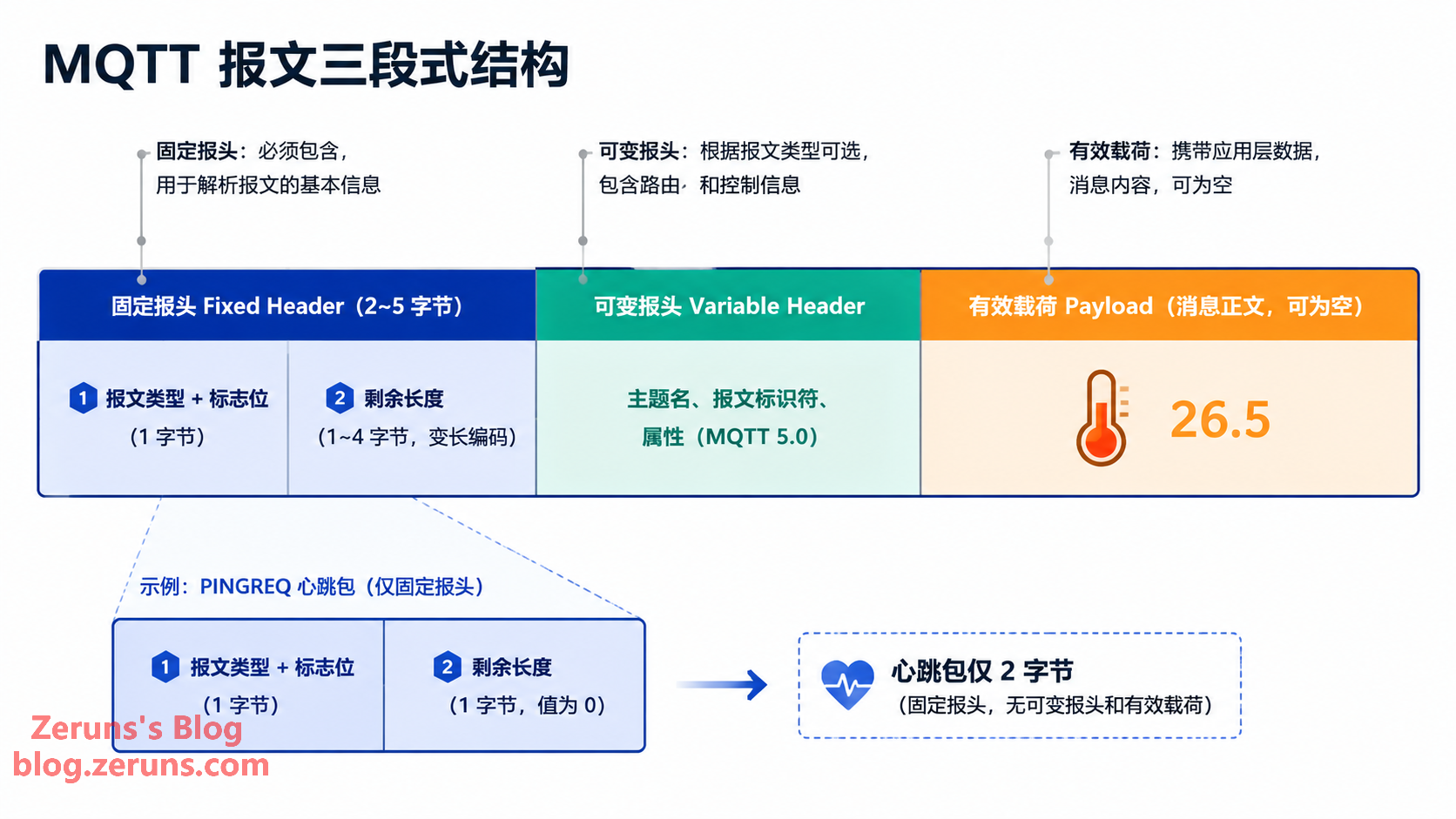
An MQTT packet consists of three parts: Fixed Header + Variable Header + Payload. In the fixed header, the upper 4 bits of the first byte indicate the packet type (CONNECT, PUBLISH, SUBSCRIBE, PINGREQ, etc. — 14 types in total), and the lower 4 bits are flag bits. This is followed by a variable-length encoded "Remaining Length" field, which takes a minimum of just 1 byte. In other words, a heartbeat packet is a grand total of 2 bytes — that's the foundation of MQTT's "lightness."
5. MQTT 5.0: A Genuinely Meaningful Upgrade
Released in 2019, MQTT 5.0 addresses many engineering pain points while maintaining its lightweight nature:
- Reason Codes: Nearly all response packets now carry standardized reason codes. A rejected connection or failed subscription is no longer a vague "failure" — it tells you exactly why.
- Properties System: Packets can carry flexible metadata key-value pairs, on which many new capabilities are built.
- Shared Subscriptions: Multiple subscribers form a consumer group (e.g.,
$share/group1/topic), and each message is delivered to only one member of the group — naturally achieving load balancing. This was something that required major workarounds in the 3.1.1 era. - Message Expiry Interval: Set a TTL on messages at publish time. Expired offline messages are no longer redelivered, preventing devices from being bombarded with a pile of stale commands when they come back online.
- Other improvements: Topic aliases (short numeric IDs replacing long topic names to save bandwidth), Receive Maximum flow control, server-initiated disconnect notifications, and request-response pattern support via Response Topics.
In a nutshell: 3.1.1 gets the job done, 5.0 does it better. New projects are recommended to go straight to 5.0.
6. Side-by-Side Comparison: MQTT vs HTTP vs CoAP vs WebSocket
Saying MQTT is good isn't enough — let's put it in context with other protocols, and its positioning becomes clear:
| Dimension | MQTT | HTTP | CoAP | WebSocket |
|---|---|---|---|---|
| Communication model | Publish/Subscribe | Request/Response | Request/Response (REST-like) | Full-duplex data stream |
| Transport layer | TCP | TCP | UDP | TCP |
| Min packet overhead | 2 bytes | Hundreds of bytes in headers | 4 bytes | 2-byte frame header minimum |
| Cloud-initiated push | Native | Not supported (needs polling workaround) | Requires Observe | Supported |
| Message reliability | Built-in 3-level QoS | Relies on TCP | Optional ack/retransmit | None, must build your own |
| Low-power fit | Excellent | Poor | Excellent (UDP is more power-efficient) | Moderate |
| Typical use case | Device-to-cloud, telemetry, remote control | Web pages, public APIs, file transfer | Extremely resource-constrained sensor networks | Web real-time interaction, chat rooms |
One-sentence summary: HTTP is for humans, WebSocket is for browsers, CoAP is for extremely constrained devices, and MQTT is for "massive device fleets + unreliable networks + bidirectional real-time" scenarios.
7. Typical Application Scenarios: You're Probably Using It Every Day
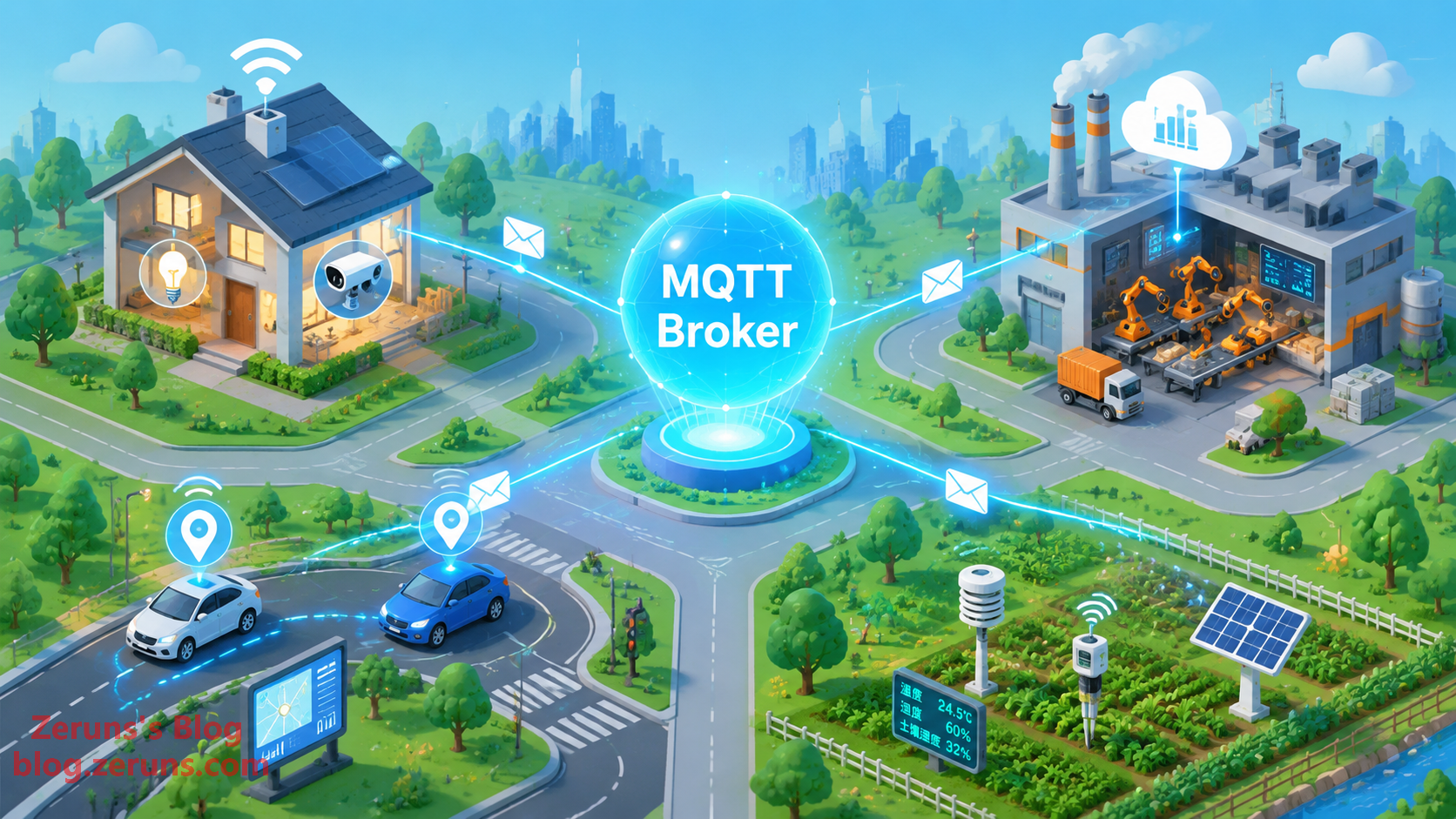
- Smart Home: MQTT's biggest installed base. The open-source platform Home Assistant integrates a huge number of devices via MQTT. Your lights, outlets, and temperature sensors at home are very likely maintaining a persistent connection to some Broker right now.
- Industrial IoT (IIoT): PLCs, machine tools, and instruments on the production line report data to a plant-level Broker, which MES systems and monitoring dashboards subscribe to as needed. On cloud platforms like Alibaba Cloud IoT and AWS IoT Core, MQTT is the primary protocol for the device access layer.
- Connected Vehicles: Fleet management platforms use MQTT to push commands to and collect vehicle status from thousands of vehicles. QoS tiering maps perfectly to differentiated requirements like "position reports can tolerate loss, but remote vehicle lock commands must arrive."
- Environmental & Agricultural Monitoring: Soil sensors in the fields and water quality monitoring stations by reservoirs run on batteries and solar power. MQTT's low power consumption and disconnect-buffering capabilities are essential.
8. Hands-On: Get Your First MQTT Message Running in Ten Minutes
Reading about it only goes so far — the barrier to actually trying it is remarkably low.
Choosing a Broker
- EMQX: Open-source, made in China, with strong performance and developer-friendly Chinese documentation. It also offers a public test Broker at
broker.emqx.io— the top choice for getting started. - Mosquitto: An Eclipse Foundation project, written in C, extremely lightweight — runs even on a Raspberry Pi. Great for local debugging.
- HiveMQ: A Java-based enterprise solution with solid commercial support.
Choosing a Client Tool
- MQTTX: A cross-platform desktop client from EMQ (also available as CLI and Web versions). Intuitive interface, an essential tool for protocol debugging.
- mqtt-cli / mosquitto_pub, mosquitto_sub: Handy tools for command-line enthusiasts.
A Ready-to-Run Python Example
Install the dependency: pip install paho-mqtt
Subscriber (subscriber.py):
import paho.mqtt.client as mqtt

def on_connect(client, userdata, flags, reason_code, properties):
    print("Connected:", reason_code)
    client.subscribe("home/livingroom/temperature", qos=1)

def on_message(client, userdata, msg):
    print(f"Received [{msg.topic}] {msg.payload.decode()}")

client = mqtt.Client(mqtt.CallbackAPIVersion.VERSION2)
client.on_connect = on_connect
client.on_message = on_message
client.connect("broker.emqx.io", 1883, 60)
client.loop_forever()
Publisher (publisher.py):
import paho.mqtt.client as mqtt

client = mqtt.Client(mqtt.CallbackAPIVersion.VERSION2)
client.connect("broker.emqx.io", 1883, 60)
client.publish("home/livingroom/temperature", "26.5", qos=1)
client.disconnect()
print("Sent")
Run the subscriber first, then the publisher, and you'll see that "26.5" appear in the subscriber's terminal — the smallest "heartbeat" in the IoT world.
One final reminder: public test Brokers are shared by everyone. Never send any sensitive data to them. For production projects, self-host or purchase a Broker service, and always enable TLS encryption and authentication.
9. Conclusion
MQTT's success lies not in how advanced it is, but in its extreme restraint: the small packets, low power consumption, and unreliable-network resilience that were forced out of it in the harsh environment of "oil pipelines + satellite links" happen to hit the exact core needs of a massive IoT device fleet. The decoupling model of publish/subscribe, the flexible reliability of three-level QoS, and pragmatic designs like Last Will and Retained messages — all centered around the reality that "devices will go offline" — have made it today's de facto standard protocol for IoT.
If you're working on smart hardware or backend development, my advice is: first run through a publish/subscribe cycle with a public Broker and MQTTX, then carefully study QoS and session mechanisms — once you've digested those two, you've got 80% of MQTT in hand.
Thirty years ago, that oil pipeline stretching across the wilderness probably never imagined that the little protocol designed for it would today be running on billions of devices. The vitality of a technology often hides in this kind of "just right" design.
Further Learning Resources
- MQTT Official Specification (OASIS): https://docs.oasis-open.org/mqtt/mqtt/v5.0/mqtt-v5.0.html
- MQTT Official Site & Tutorials: https://mqtt.org/
- HiveMQ MQTT Essentials Tutorial Series (English, comprehensive): https://www.hivemq.com/mqtt/
- Electronics/Embedded Forum: https://bbs.eeclub.top/

Recommended Reading
- Affordable & high-value VPS / cloud server recommendations: https://blog.zeruns.com/archives/383.html
- AI large model API platform recommendations and overview: https://blog.zeruns.com/archives/947.html
- Minecraft server hosting tutorials: https://blog.zeruns.com/tag/mc/
- Hermes Agent deployment guide — set up your first AI assistant step by step: https://blog.zeruns.com/archives/939.html
- Ugreen DXP4800Pro NAS unboxing, review, and teardown: https://blog.zeruns.com/archives/949.html
- Operational Amplifier (Op-Amp) beginner's guide: from principles to practice: https://blog.zeruns.com/archives/938.html
评论